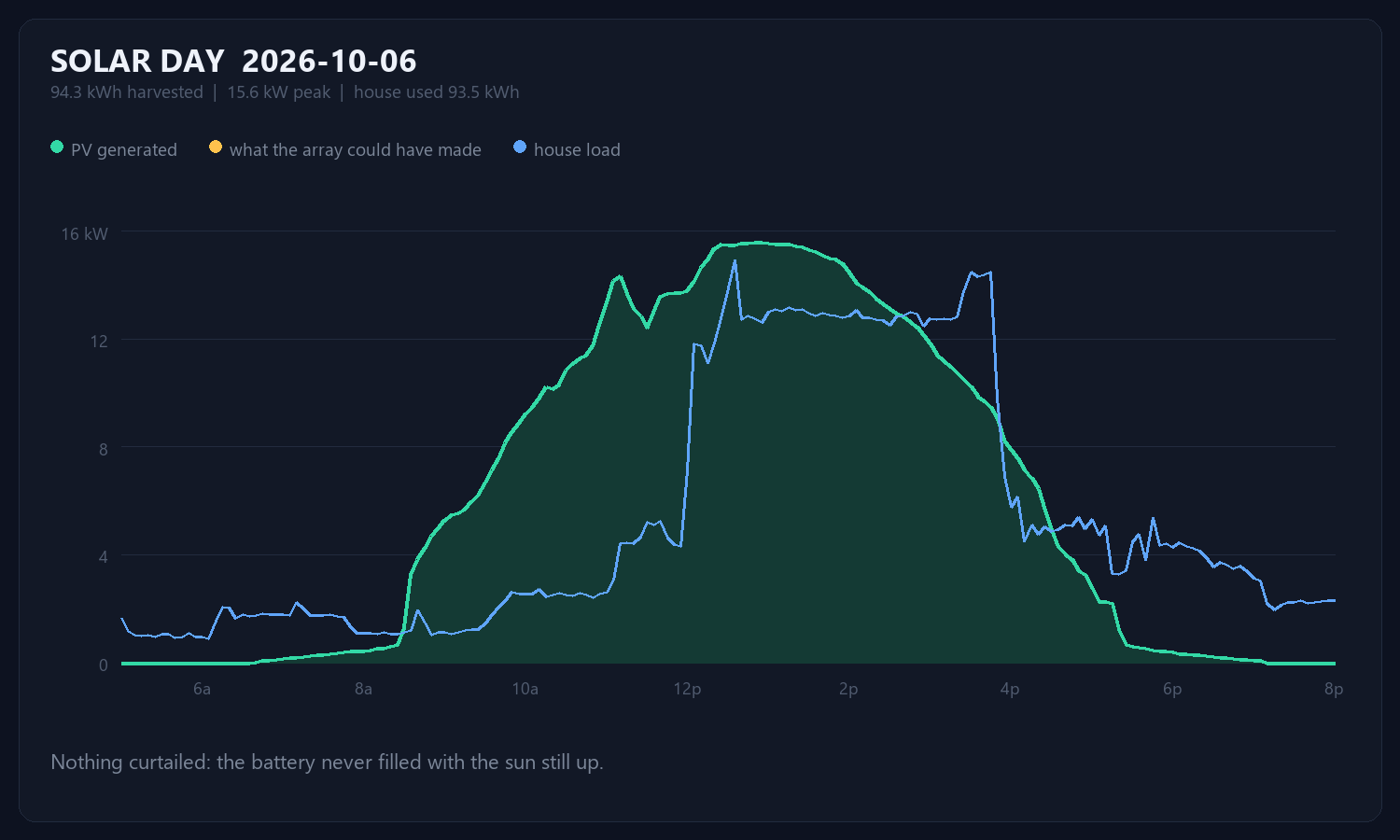
2026-10-06: 94.3 kWh harvested, peaking at 15.6 kW. The house used 93.5 kWh. Nothing was curtailed today – the battery never filled while the sun was still up.
A starting point for solving problems
2026-10-06: 94.3 kWh harvested, peaking at 15.6 kW. The house used 93.5 kWh. Nothing was curtailed today – the battery never filled while the sun was still up.
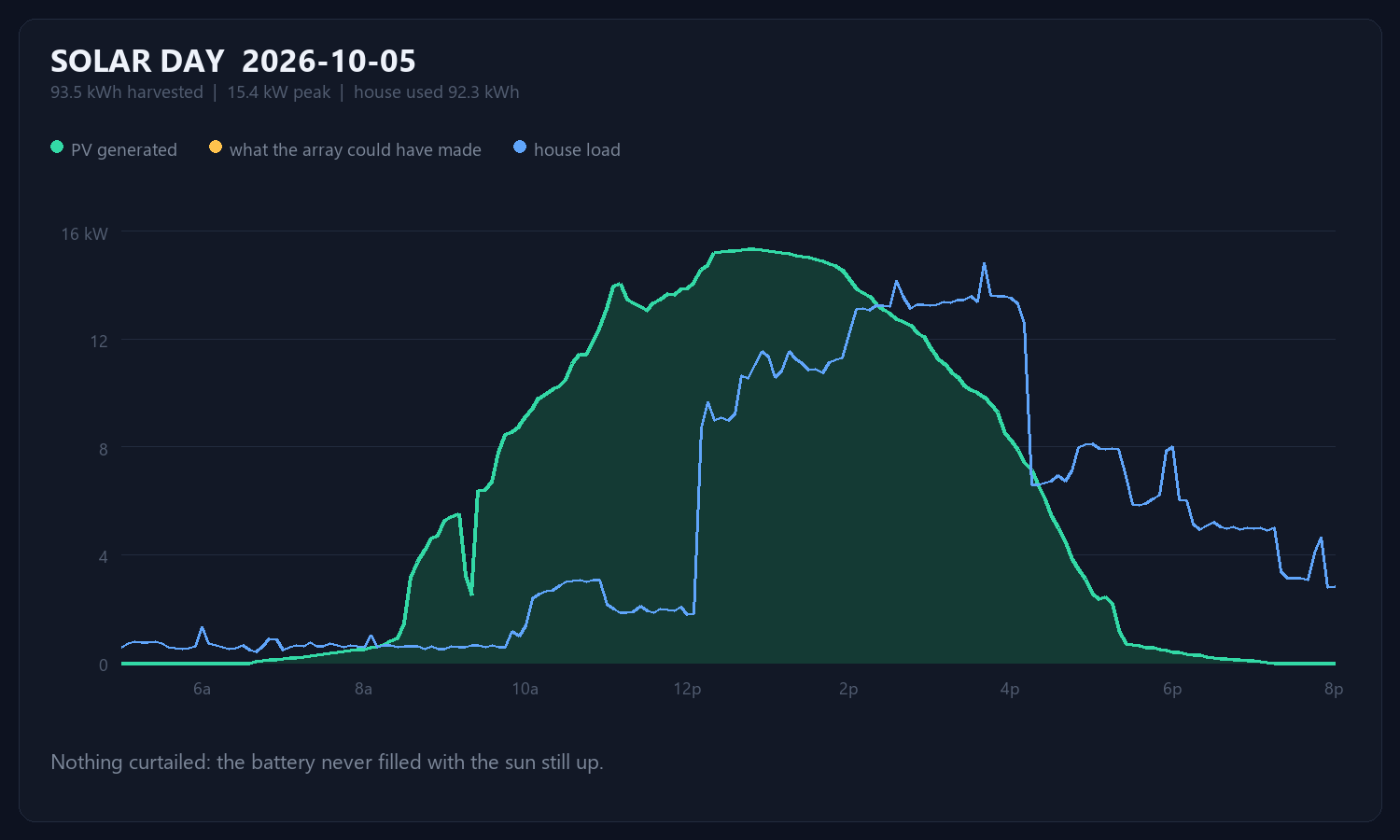
2026-10-05: 93.5 kWh harvested, peaking at 15.4 kW. The house used 92.3 kWh. Nothing was curtailed today – the battery never filled while the sun was still up.
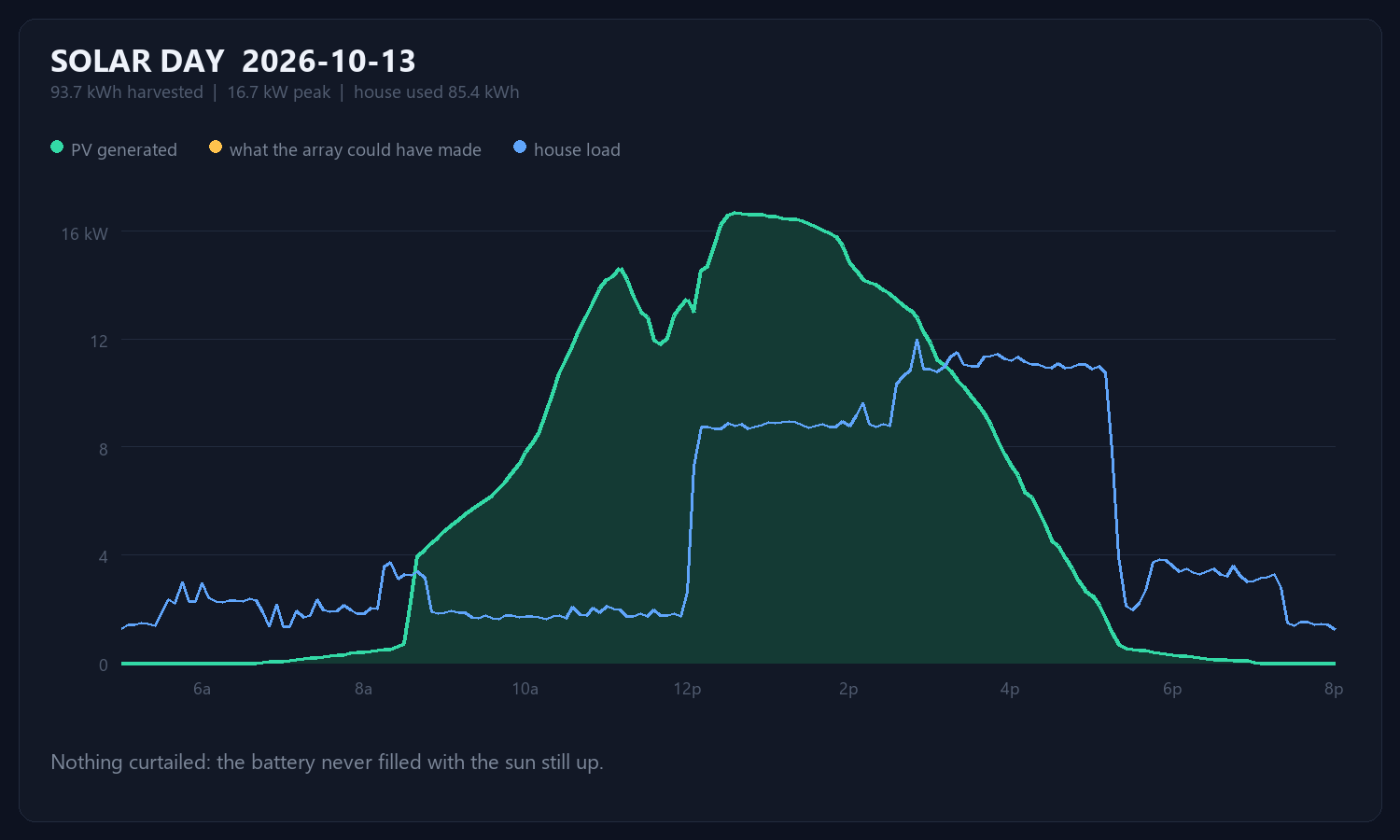
2026-10-13: 93.7 kWh harvested, peaking at 16.7 kW. The house used 85.4 kWh. Nothing was curtailed today – the battery never filled while the sun was still up.
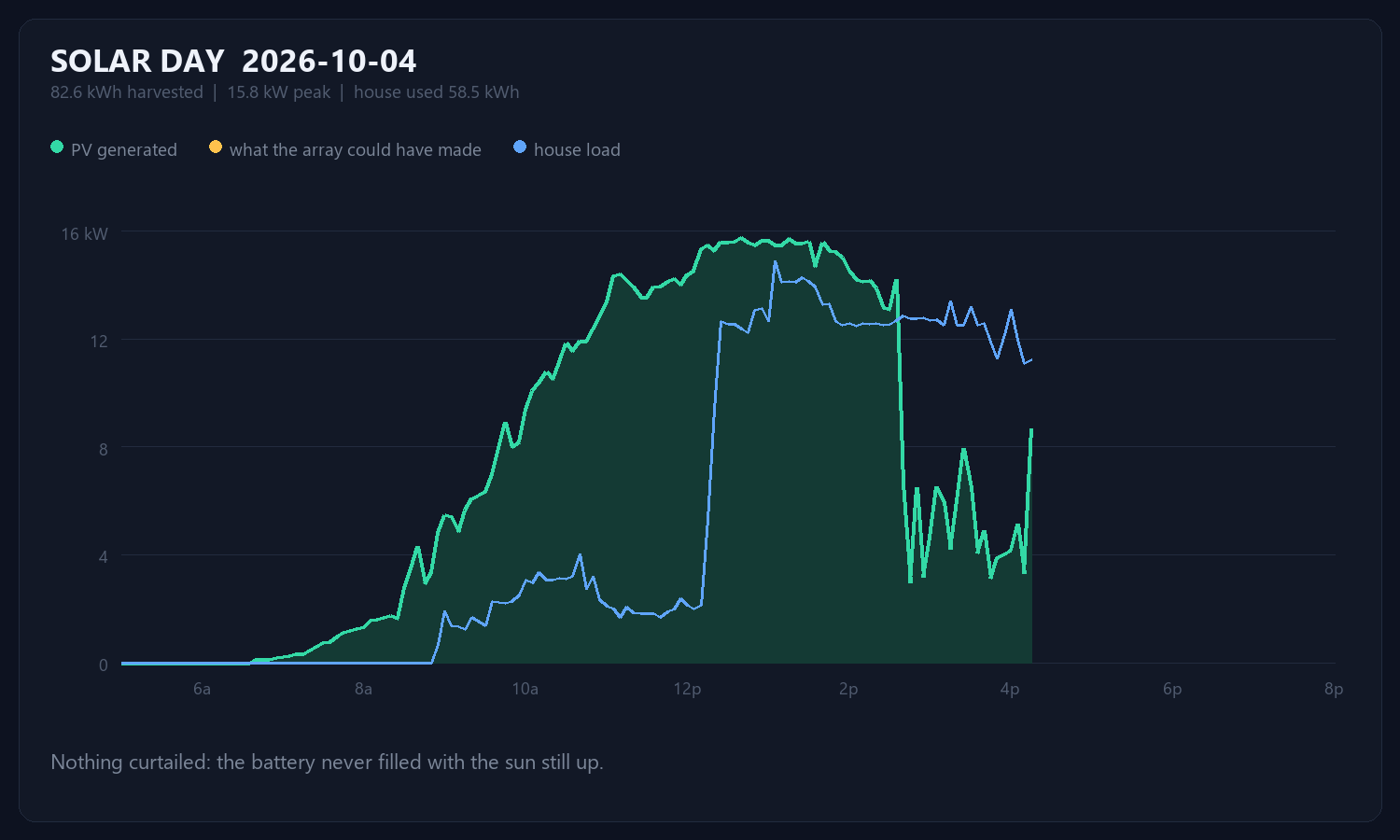
2026-10-04: 82.6 kWh harvested, peaking at 15.8 kW. The house used 58.5 kWh. Nothing was curtailed today – the battery never filled while the sun was still up.
Saturday started at 5:25 in the morning with a dead laptop, a house battery at
5.8 percent, and both inverters missing from their own cloud. Sunday ended with
a sonar on top of a hill reporting gallons and gallons-per-minute, the battery
monitor on a wire updating once a second, both inverters answering over RS485,
and a wall display that a grandfather can read from across the room.
This is the long version of how that happened, including every wrong turn,
because the wrong turns are the useful part.
The laptop that runs everything had lost wall power Friday evening and shut
itself down on a critical battery at 10:23 PM. When it came back at dawn,
this is what the wall looked like:
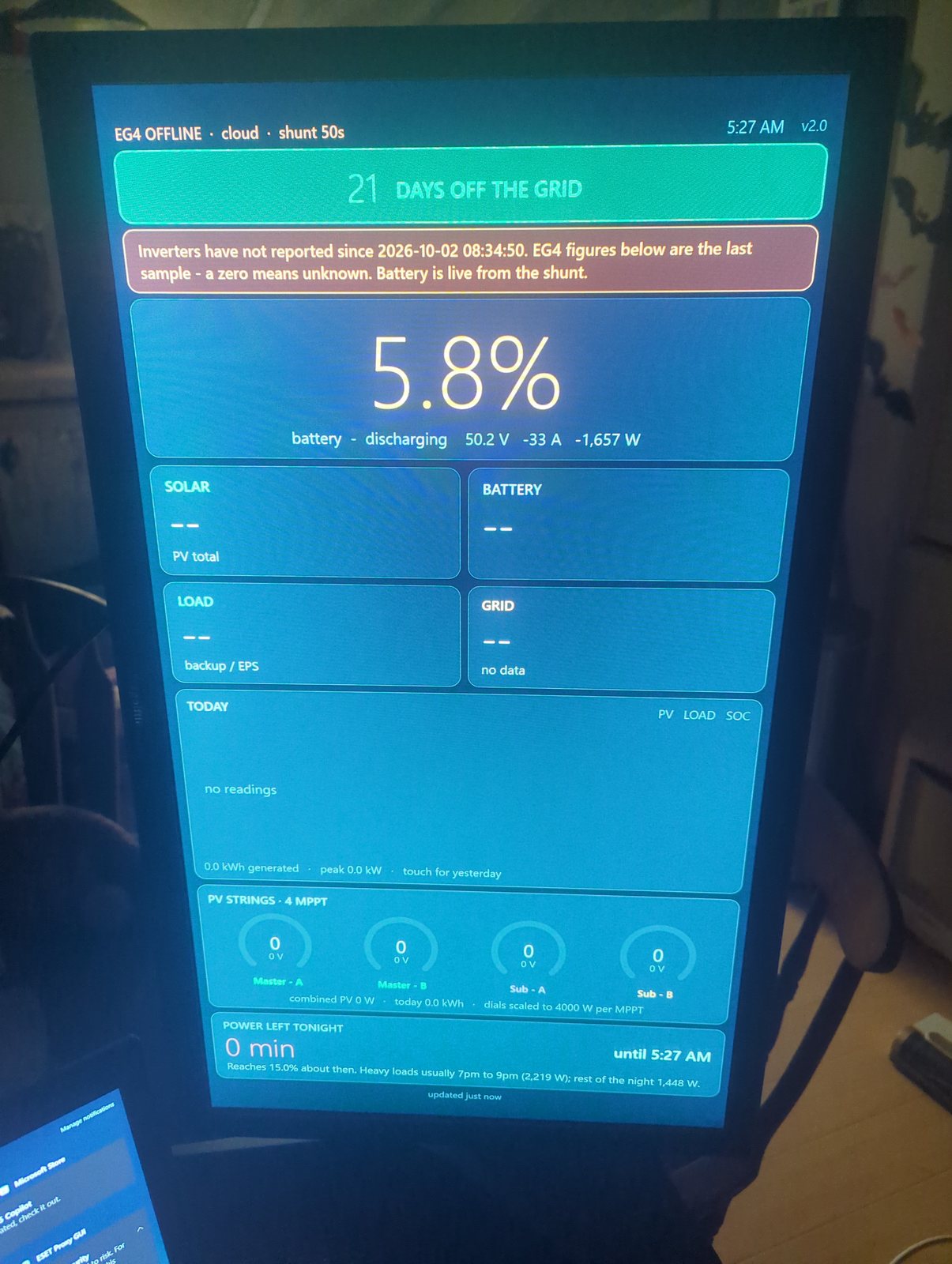
Version 2.0. A stack of cards, most of them dashes, because the inverters had
stopped reporting to the vendor’s cloud the morning before. The one live number
was the battery, from the Victron shunt, and it said 5.8 percent and falling at
1.7 kW. The “power left tonight” card said zero minutes, because it was
counting down to a 15 percent floor we had sailed through hours earlier.
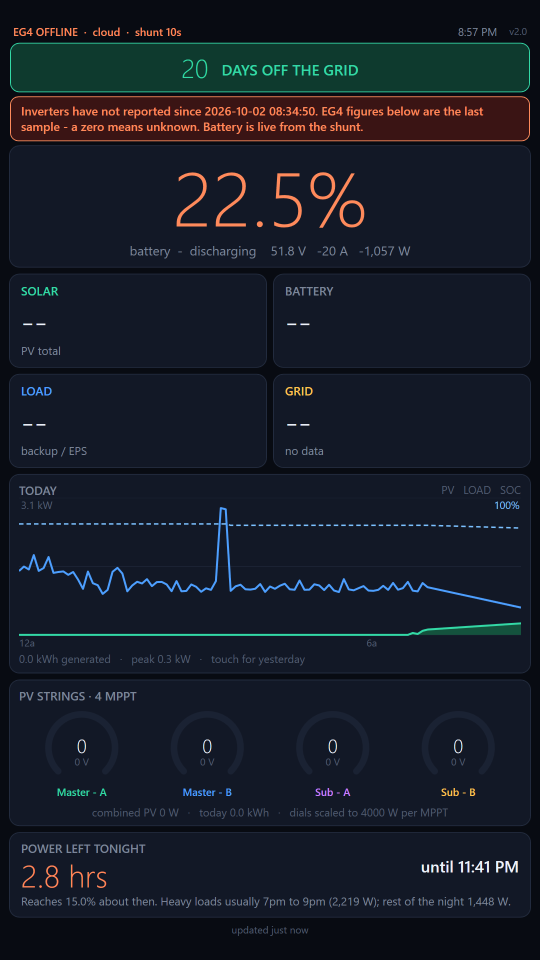
That screen had three problems that shaped the whole weekend. It depended on
two vendor clouds, so when either one hiccupped it went blank. It was slow: the
battery figure came from a database that only produced a new sample about every
105 seconds. And it told you nothing about water, which on a ranch is the other
thing you run out of.
The plan: move the operation to a second laptop that lives in the solar room,
wire that laptop directly to the equipment, and put a level sensor on the tanks
half a mile up the hill.
The work ran as two Claude Code sessions, one on the laptop that travels and
one on the laptop that stays, messaging each other over a Tailscale network.
One did the radio firmware, the phone app and the coordination. The other owned
the wall display and everything plugged into it. Most of what follows was
decided on a phone, standing next to whatever was being wired.
The tank link is two Heltec LoRa boards. The one that goes up the hill got
named HILL, the one at the bottom BASE, and the name is printed in big letters
on each screen so they cannot be mixed up. The first firmware was a range
tester: HILL pings, BASE answers, both screens show signal strength in both
directions.
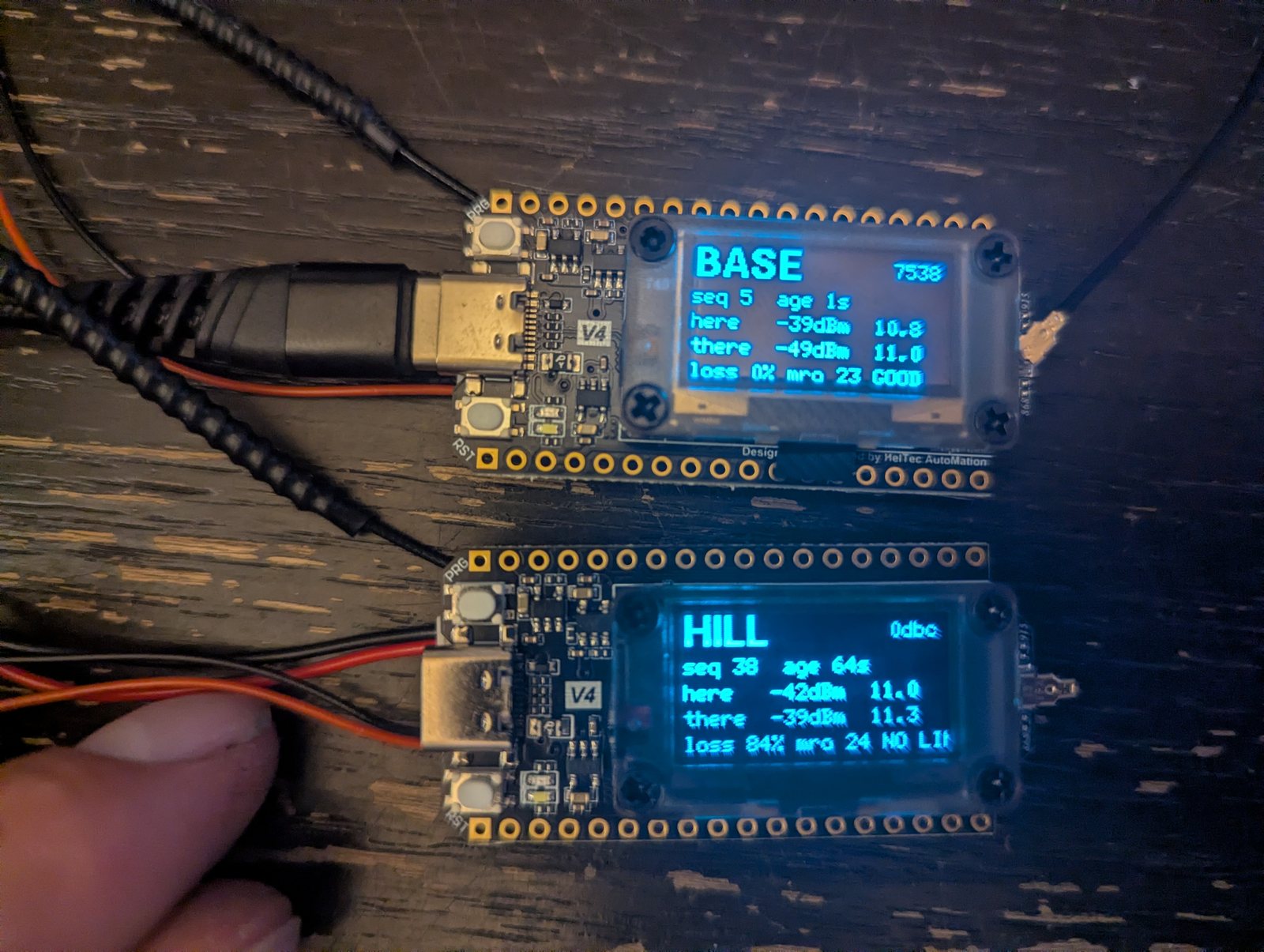
That photo caught the first real bug. BASE says GOOD, sequence 5, one second
old. HILL says sequence 38 and no link. BASE was frozen. With its USB cable
plugged in and nothing reading the log, the log buffer filled after six lines
and the board hung waiting to write. The fix was to drop a log line when the
buffer is full instead of waiting. The same photo shows the second bug: “NO
LINK” was two characters too wide for the screen.
Then the walk. It failed in the front yard.
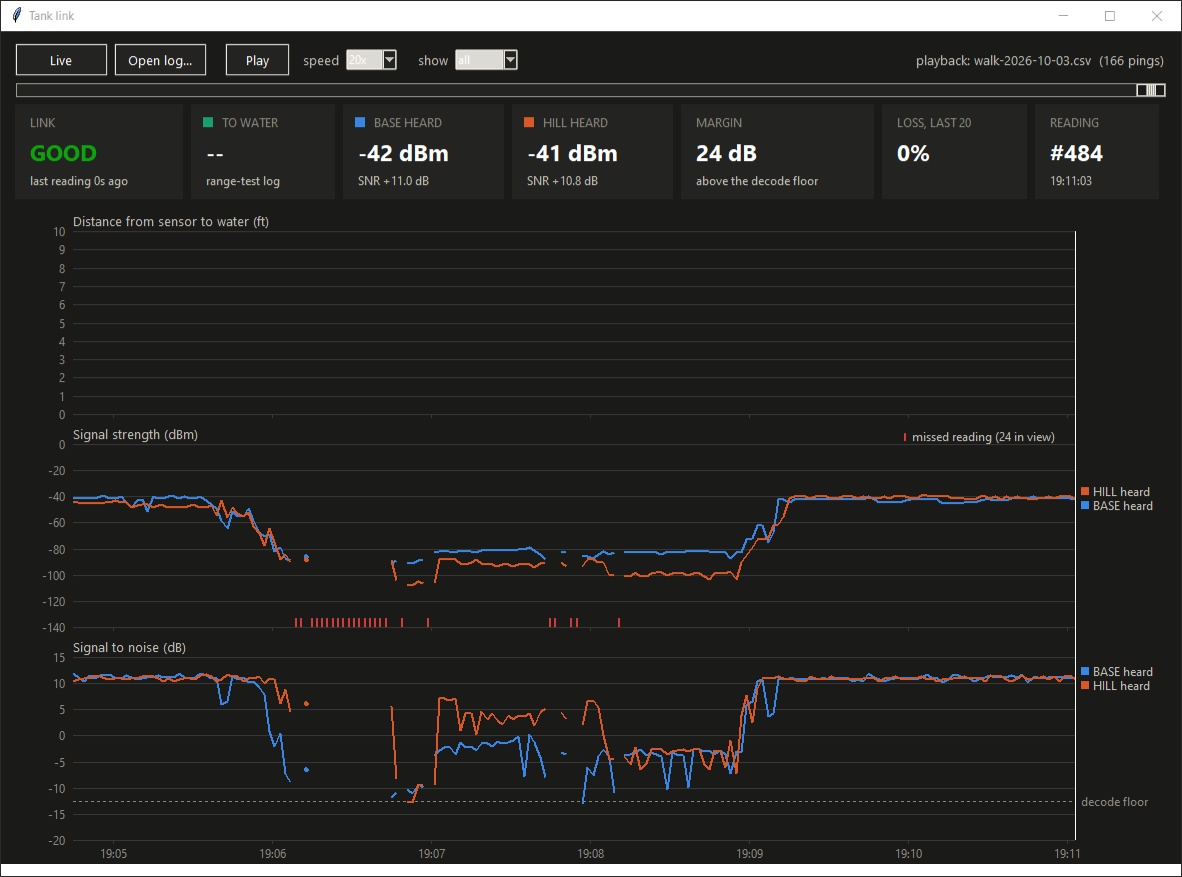
Fifteen pings missed in a row, through one wall and some Douglas fir. The
owner’s reaction was the right one: something is wrong. It was. These boards
come in two revisions with different radio amplifier chips, and on this revision
one control pin has to be flipped for every transmission. The firmware was
holding it in the receive position, so the amplifier never switched on and the
signal leaked out roughly 40 dB down, about a ten-thousandth of the intended
power. With the fix, the same two boards on the same desk went from -40 dBm
to about 0.
The next walk reached a quarter mile. Then a 40 minute drive around town with
the logger running:
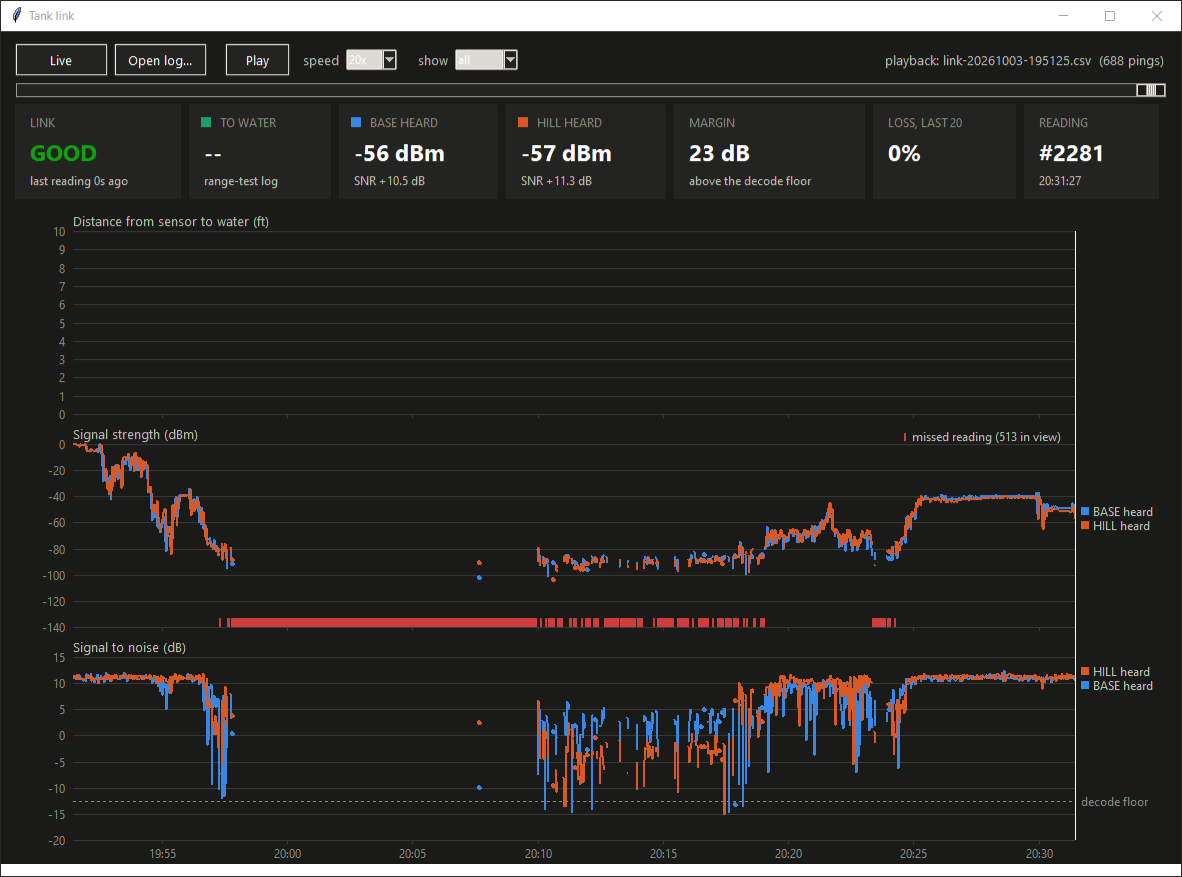
Solid out to about half a mile, a ten minute stretch of nothing at the far
end, and a clean recovery on the way back. One calibration came out of that
chart: on these boards a receive amplifier sits ahead of the measurement, so the
signal figure reads about 20 dB high. The link dies near -100 on the screen,
not the -125 you would expect from the radio chip alone. Signal-to-noise is the number
to trust.
The level sensor is a waterproof ultrasonic module, the kind used for parking
sensors. It runs from a switched 3.3 volt pin on the board, which matters
more than it sounds: the module idles at about 5 mA, and left on all day that
would be several times the rest of the power budget combined. Switched, it draws
nothing between readings.
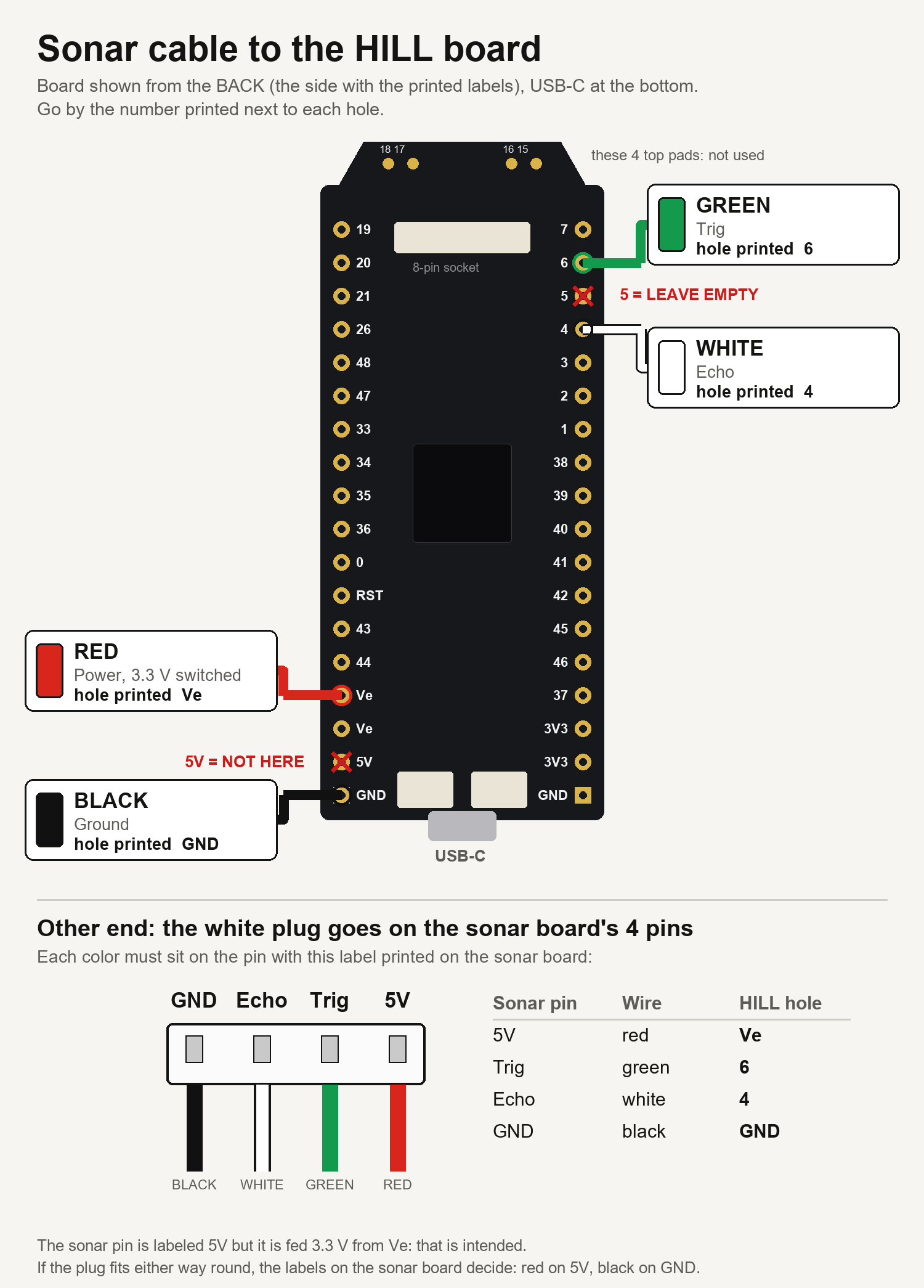
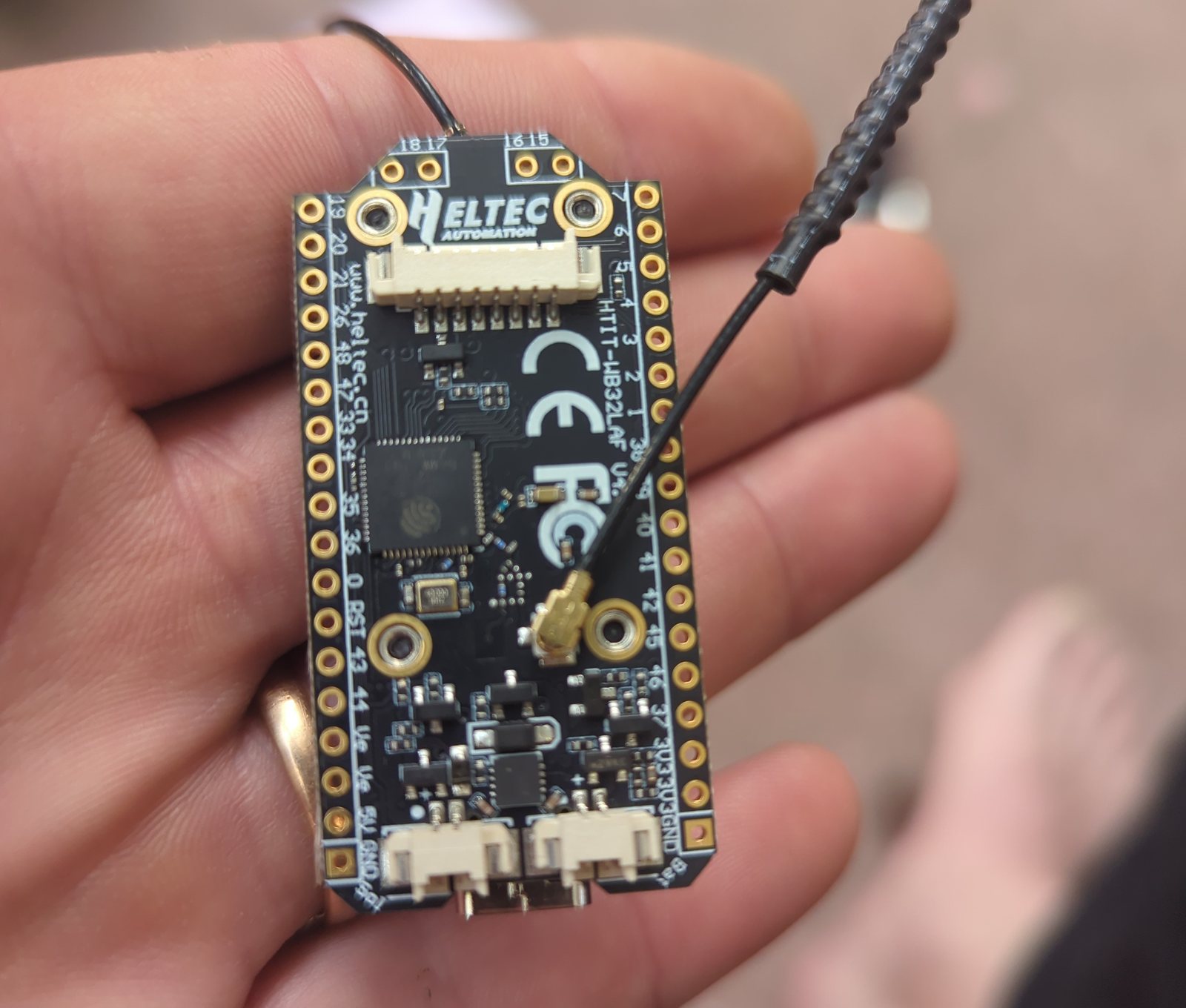
Getting four wires onto the right four holes took longer than writing the
firmware. The manufacturer’s diagram shows the front of the board; the holes are
labelled on the back; and one early message called them “pin 17 and pin 15”,
which are positions along the row and also happen to be numbers printed on four
unrelated pads. The numbers printed next to the holes are the ones the code
uses. The hole between the two sonar wires is the amplifier control pin from the
previous section, so it stays empty.
First power-up: every one of nine pings came back as a pulse of exactly 35.2
milliseconds. That is the module’s own “I heard nothing” timeout, which was
good news in disguise. It proved the board was powered, triggering and replying
at 3.3 volts. It just had nothing in front of it. Pointed at a wall, it returned
nine good pings out of nine.
Two modes came out of the bench testing. TEST takes a reading about once a
second, for aiming the sensor with the unit in your hand. FIELD takes one on a
schedule and sleeps in between. A button on either board flips the mode, and the
base station can change the schedule from the bottom of the hill, because every
answer it sends back up carries the settings.
The sensor went onto the tank 3.7 feet above the water.
The display said 3.7 feet.
The tank rules are deliberately blunt. A reading of one foot or less is FULL.
Seven feet or more, or no echo at all, is EMPTY. A sensor that produces no pulse
whatsoever is a FAULT, because “no echo means empty” would otherwise turn an
unplugged cable into an empty tank. Three 2,500 gallon tanks in parallel make
7,500 gallons, which works out to 1,250 gallons per foot of water.
Deep sleep had never run before the unit was on the hill, so it got a staged
test from below: one-minute readings first. HILL slept and woke itself three
times, 63, 63 and 59 seconds apart. Then ten minutes, and the next reading
arrived 597 seconds later.
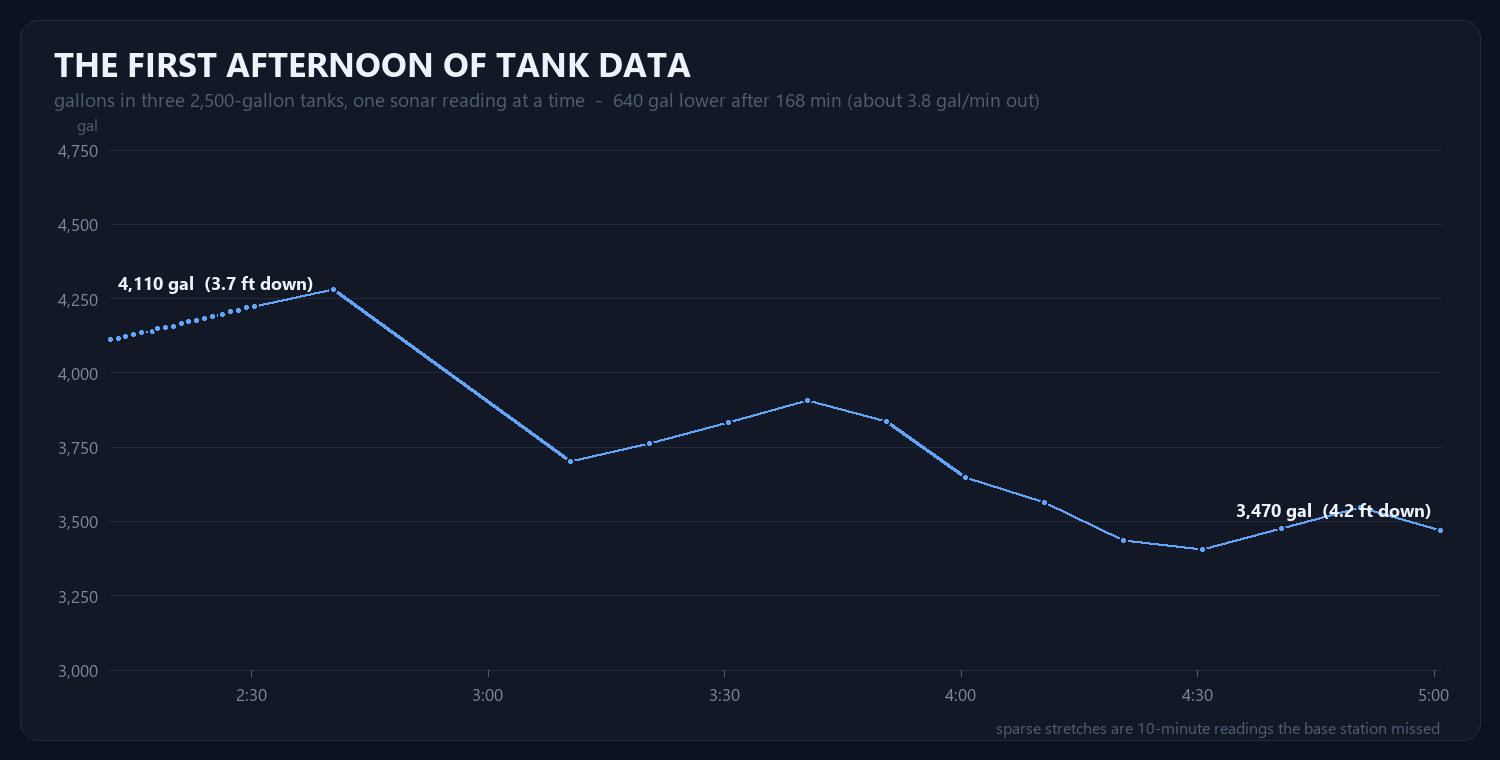
The fill and drain rate is the slope of a straight line through the last 45
minutes of readings. The sonar is good to about a centimetre, which here is
about 40 gallons, so at one reading every ten minutes the rate is honest to
roughly one gallon per minute and anything smaller is shown as “steady”.
Where to put the base station is still not solved. Next to the solar
equipment it heard the hill well but had poor WiFi, and something in that room
puts bursts of radio noise on its receiver. On a roof nearer the access point
the WiFi was fine and the radio was at the edge of what it can decode. On top of
the generator, about the same. A tall antenna for the base station is the next
experiment.
The battery monitor’s hub, a Victron Cerbo, had been reaching the internet
over weak WiFi. That afternoon the wall showed its data as 3,668 seconds old.
Most of that hour was real: the hub had been off the cloud for most of two and a
half hours.
An Ethernet switch, a WiFi extender used as a bridge, and one cable to the
hub fixed the path. Then one switch on the hub’s own screen:
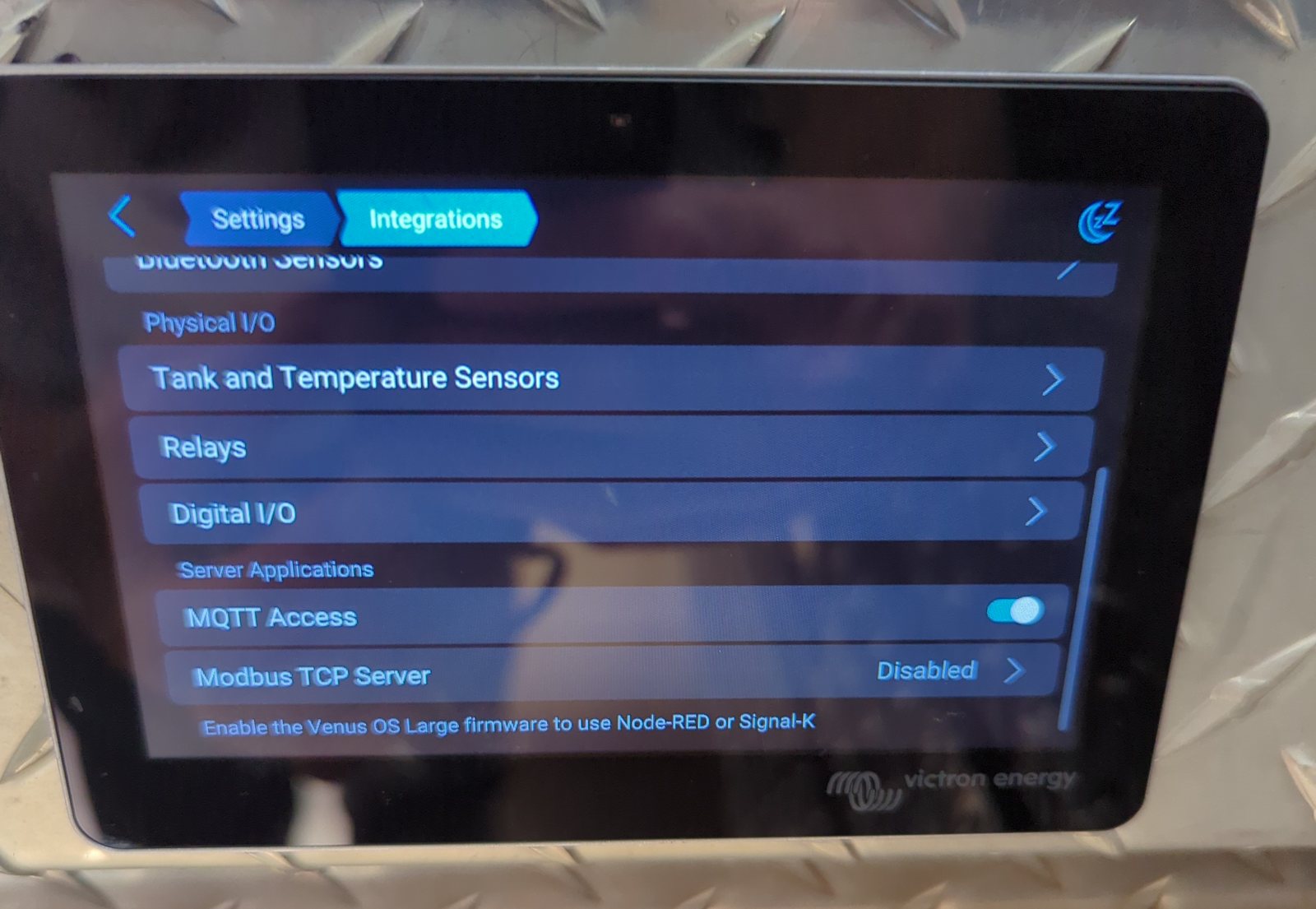
The hub wanted a password before it would hand out data, which took two
attempts to get right. Once it accepted one, the numbers were not subtle. The
first value arrived 0.6 seconds after connecting, where the cloud feed took
anywhere from five seconds to a minute. Updates come once a second. A ping to
the hub over the wire takes 0.4 milliseconds; over its WiFi a few minutes earlier it took
429.
With live data arriving, the cards stopped being good enough. The brief for
the 27 inch touchscreen was one paragraph: it should look like a picture. Solar
panels at the top. The two inverters in the middle. The battery on the left. The
load on the right, drawn as a water pump. And coming off the pump, the tanks,
with blue water at the real level.
First cut, 3:37 in the afternoon:
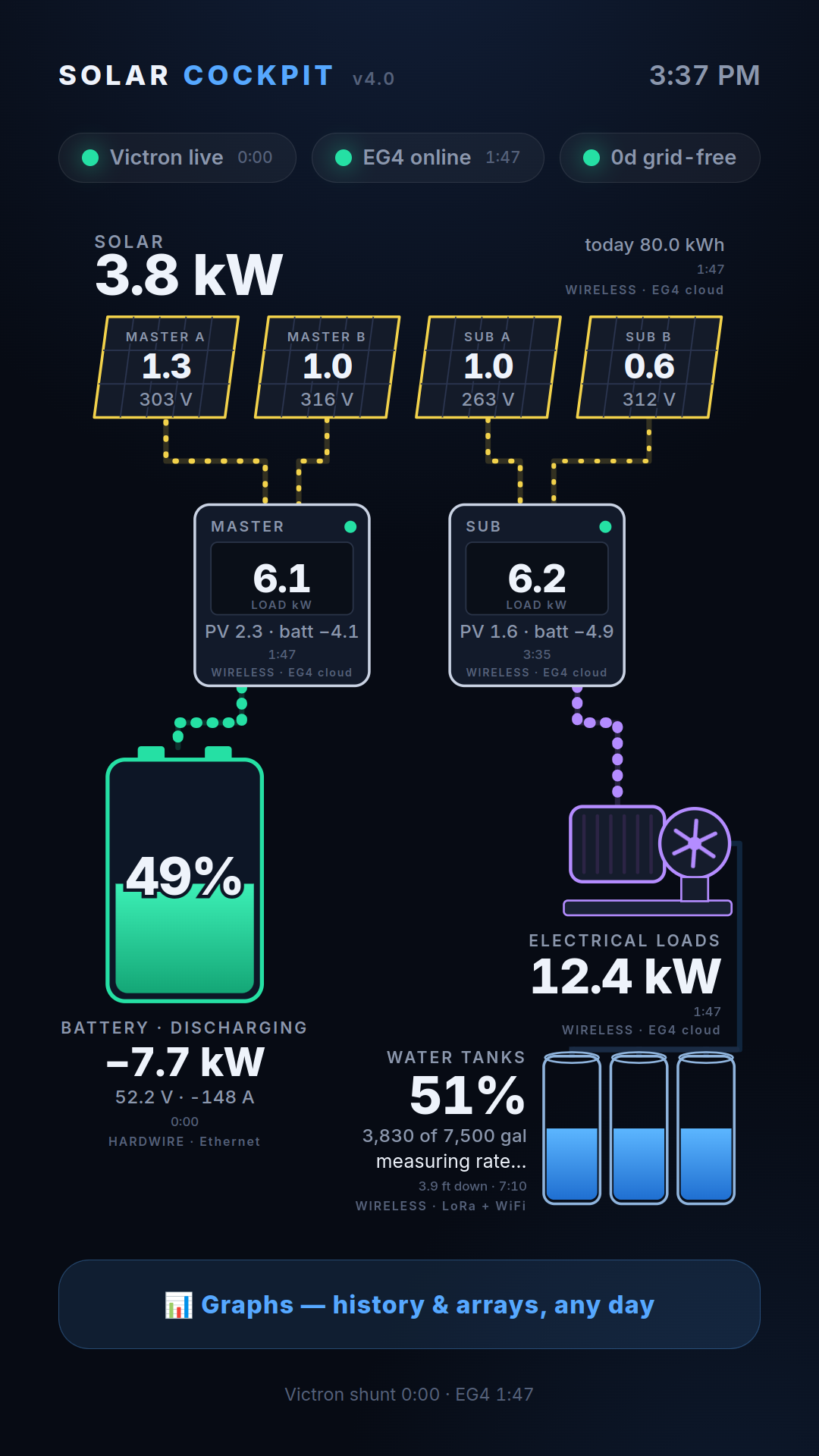
Good, and wrong in two ways that two of us spotted independently. The battery’s wire hung off one inverter and the pump’s wire off
the other, as if one charged and the other pumped. Both do both. And the battery
was green while it was draining.
Second round, 21 minutes later:
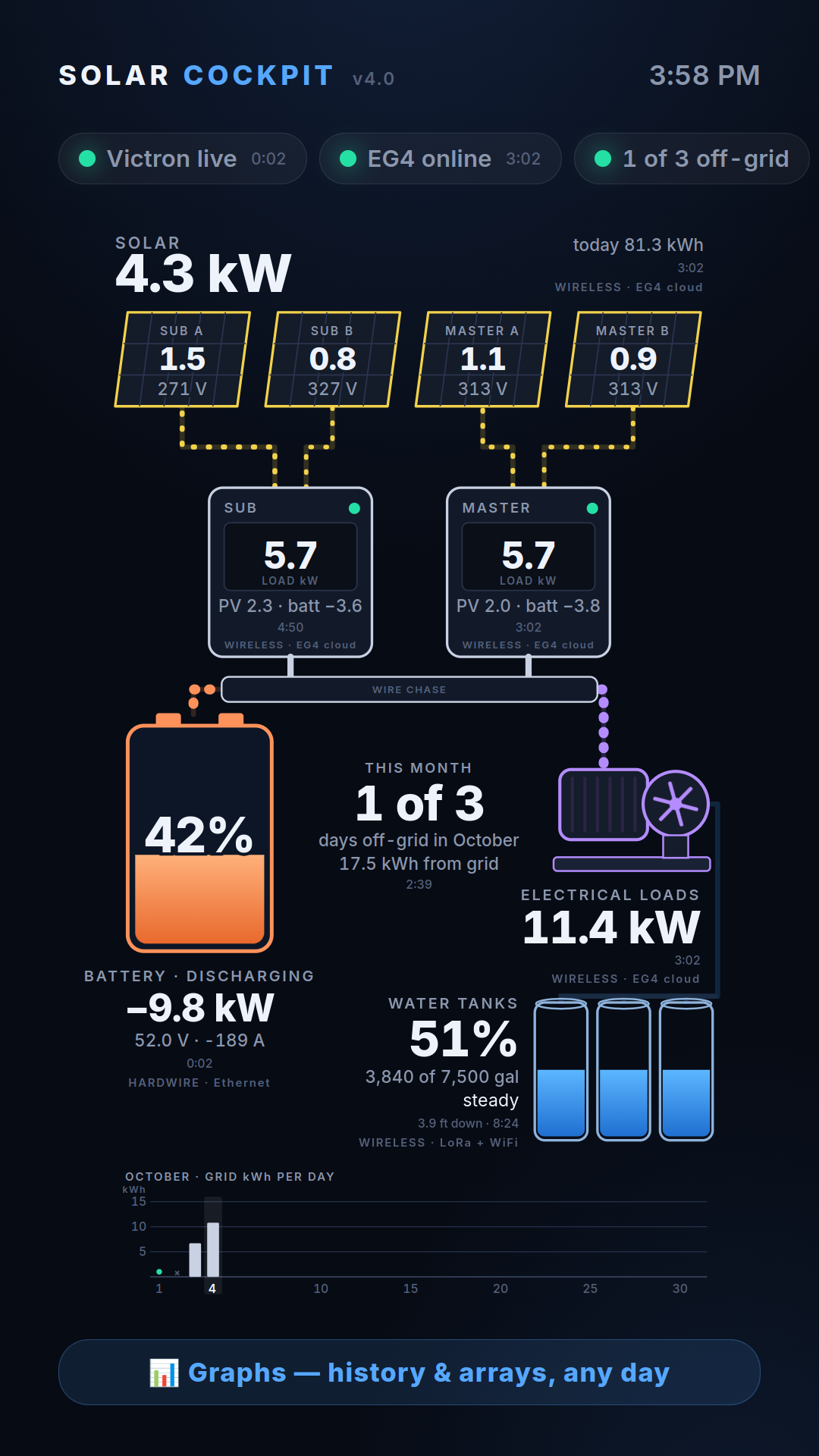
The inverters swapped sides to match the real wall. A wire chase appeared
underneath them, because there is one, six feet long, and that is where the
wires actually go. The battery turned orange while discharging; it is green when
charging and red only when it is genuinely low, so red still means something.
And the “days off the grid” counter was replaced with a month of daily bars in
the style of a utility bill.
That counter deserves a paragraph. The old screen had claimed a 21 day
streak. Part of that streak was a day when the inverters reported nothing at
all, which the old code had read as “zero grid use”. The new chart has a third
state for exactly that: a day with almost no solar recorded is marked as no
data, not as a win.
Third round, eight minutes after that:
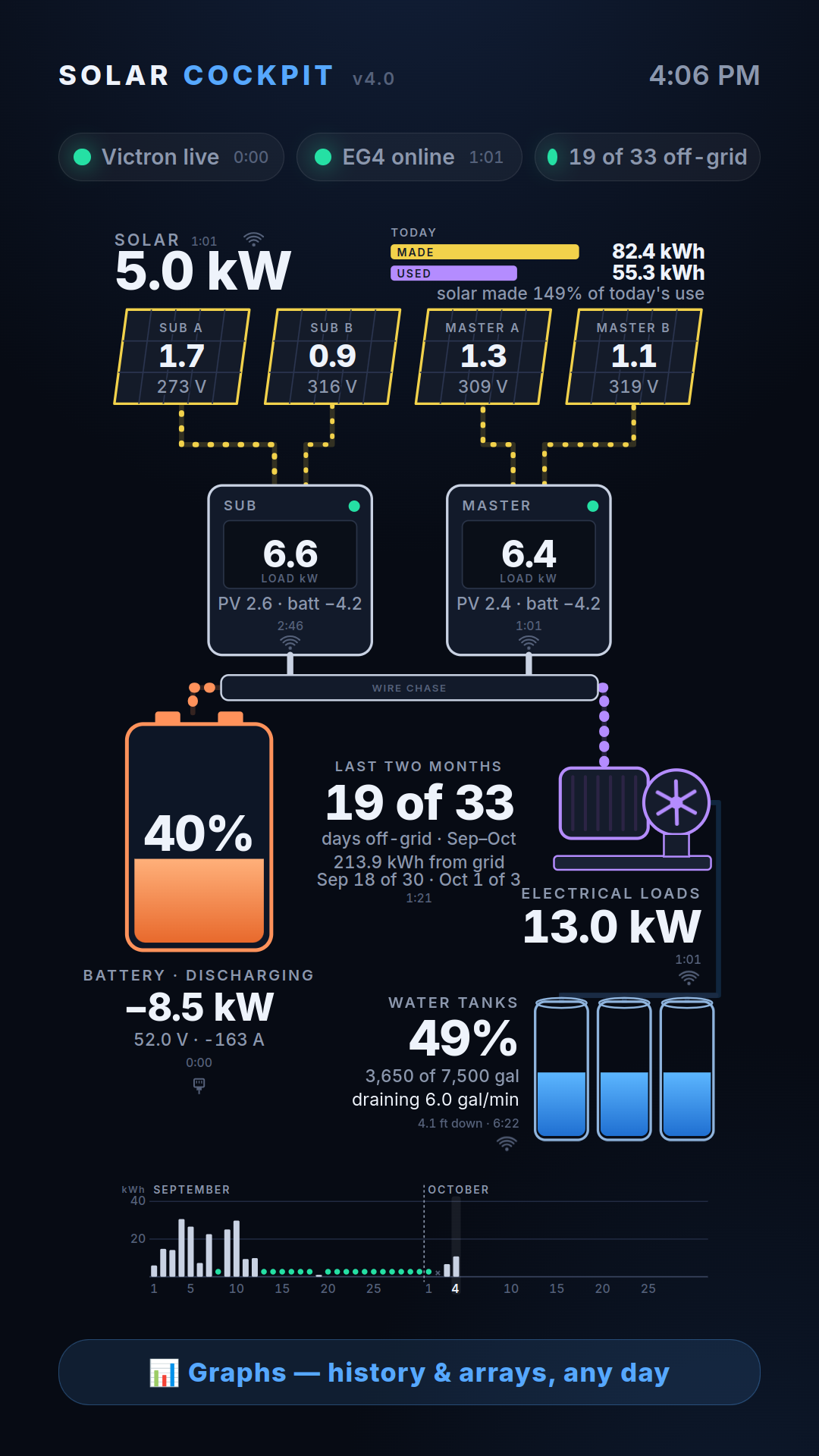
Two months along the bottom. Today’s energy at the top, made against used.
And the words “hardwire” and “wireless” replaced by a tiny plug and a tiny WiFi
symbol on each part, driven by the path the data is really taking. They are
small on purpose. One person in the family wants to know which parts are on a
wire. Another just wants to see the water.
A few rules settled along the way and are now permanent. Every number shows
its age in minutes and seconds. A reading that stops arriving is never blanked;
the last good value stays up with its timer running. And a total is never built
from half the system: if one inverter is silent, the total shows dashes and says
why.
At this point the version was set to 4.20 and pinned there. By instruction,
it stays 4.20 forever.
Last job of the day. Each inverter has an RS485 port that normally feeds its
WiFi dongle. Pull the dongle, plug in a cable, and the inverter will answer
questions directly, about once a second instead of every couple of minutes.
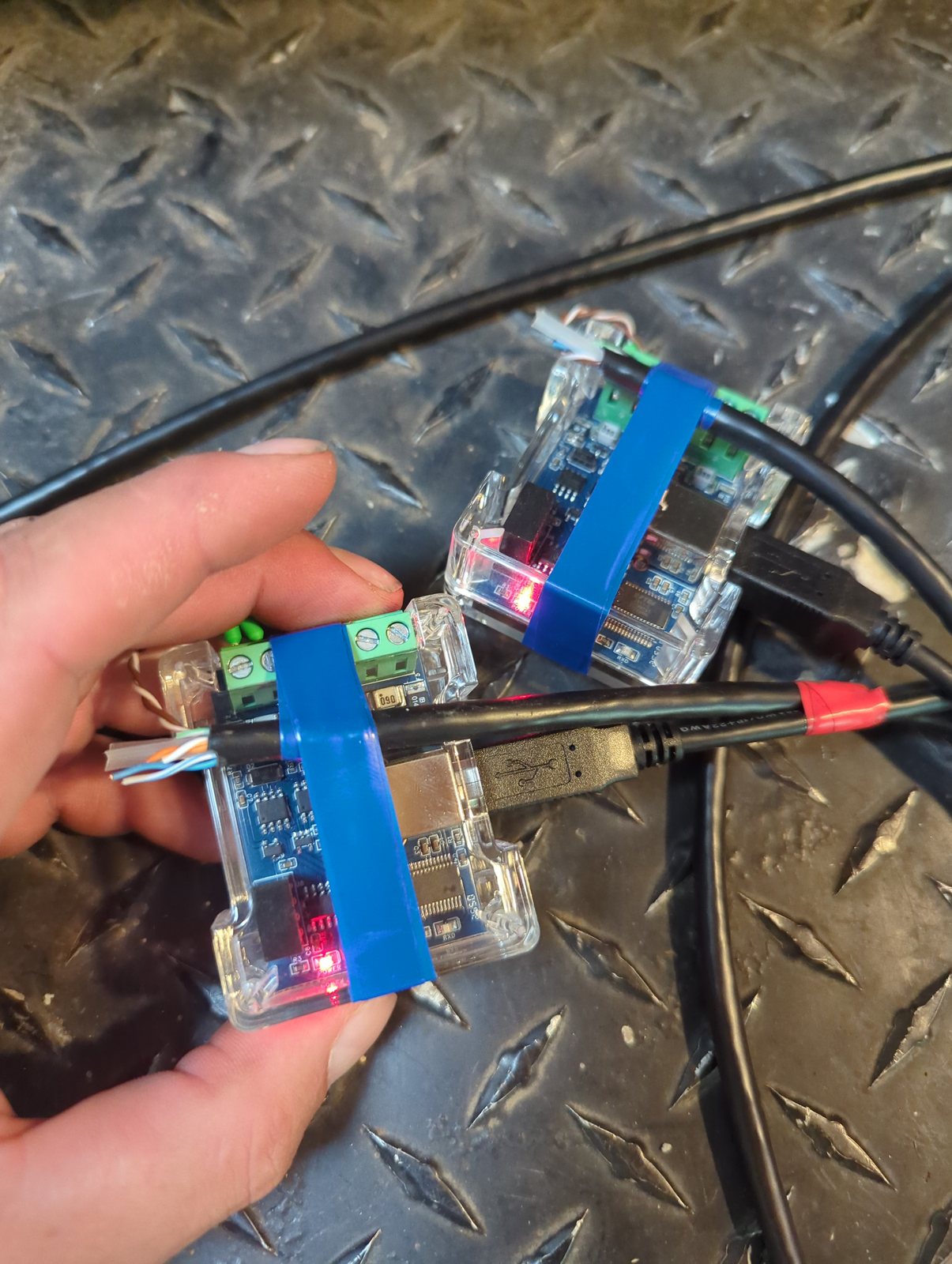
Two USB adapters, two cut-down network cables, brown and white-brown on the
screw terminals exactly as the guides on the internet show. Both dongles came
out. The wall went grey on the inverter side, as it should.
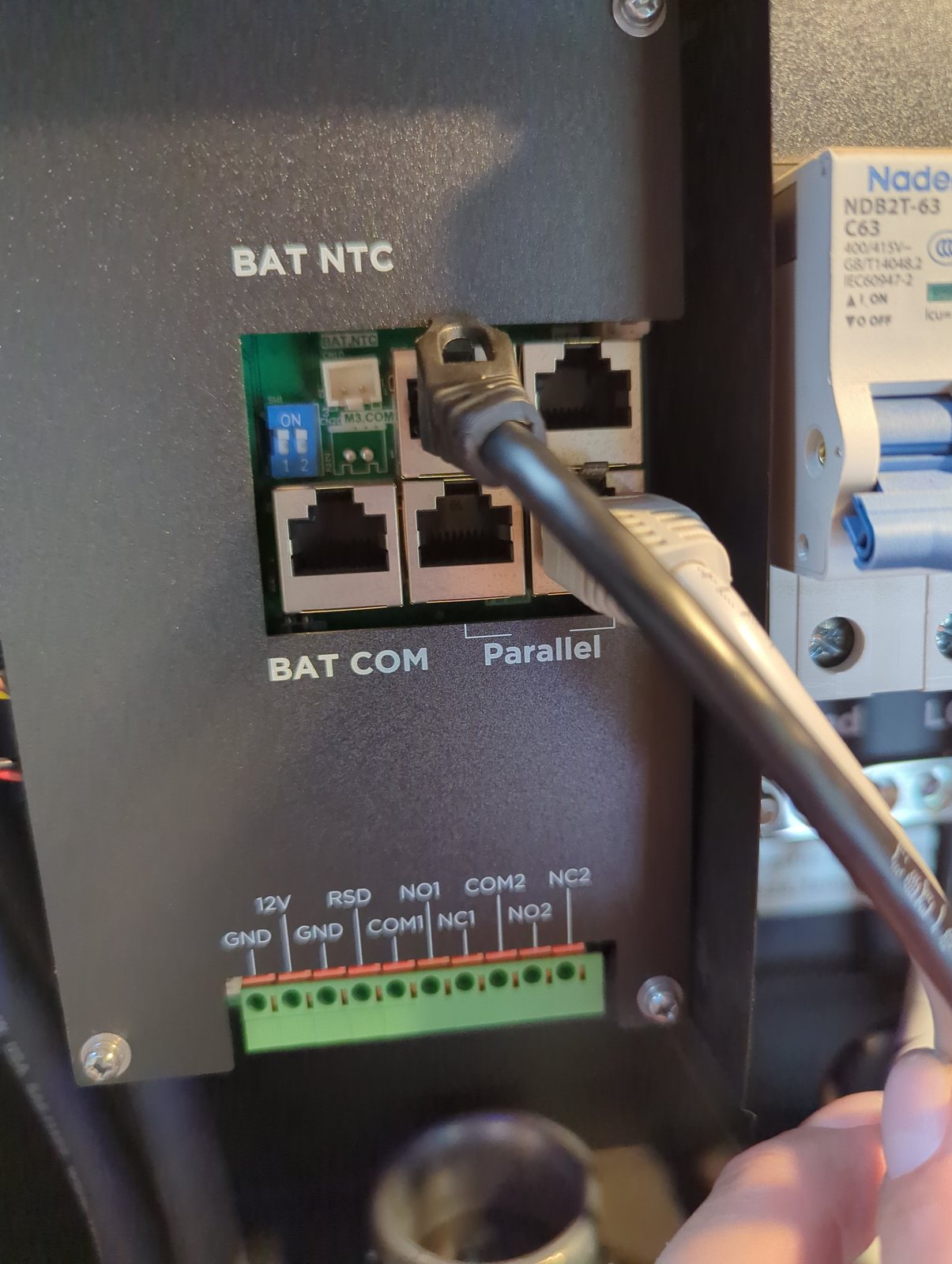
And then nothing. Read-only requests at three speeds and two addresses, on
both cables: zero bytes back. Not garbage, not errors. Silence.
Silence is a clue. A wrong speed gives you garbage. Silence means the
inverter is not hearing the question at all. The socket was right (the upper
left of the two unlabelled ones at the top). The settings were right (19200
baud, address 1, confirmed afterwards against two independent sources). That
left the two wires.
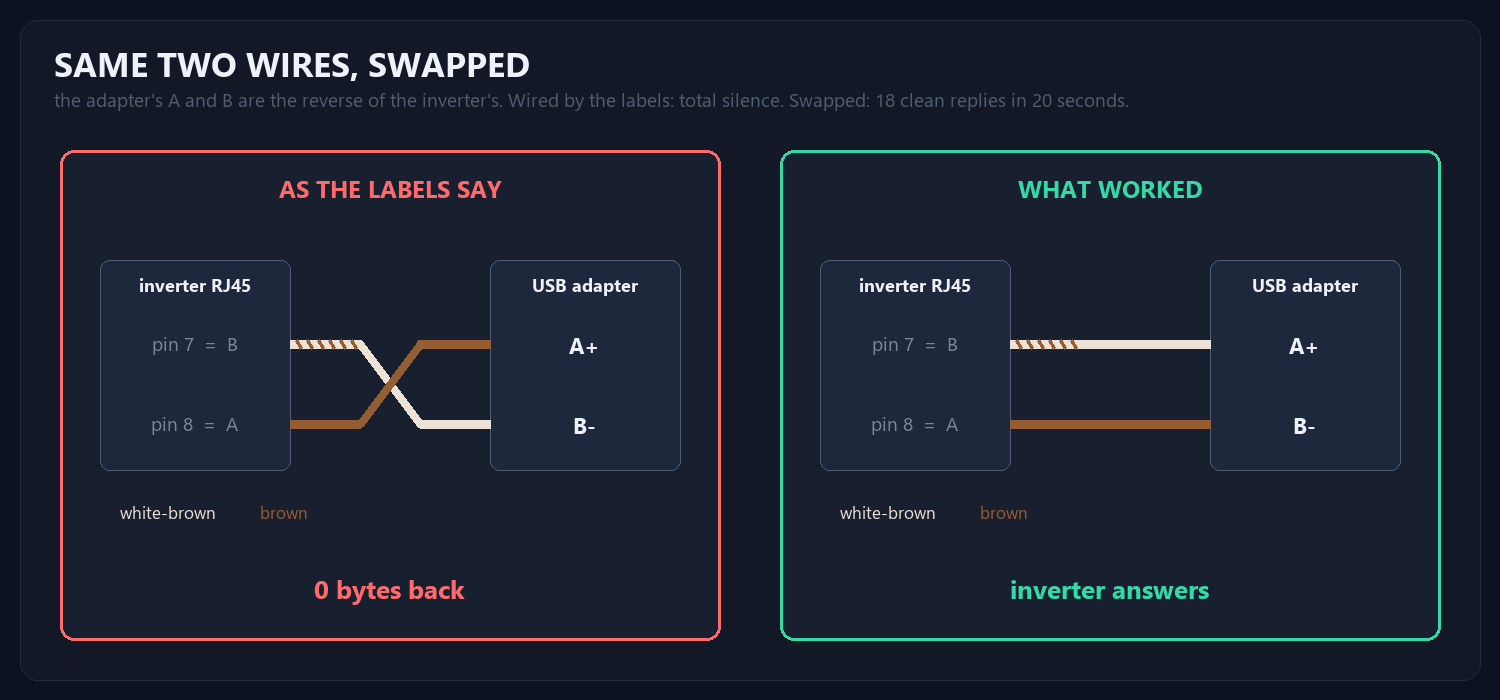
The inverter calls pin 7 “B” and pin 8 “A”. The adapter also has terminals
called A and B. They are not the same A and B. Swapping brown and white-brown
on one adapter turned twenty requests into eighteen clean replies: battery 52.4
volts, one solar string at 239 volts and 762 watts, the other at 342 volts and
906 watts, output at 239.0 volts and 59.91 hertz. The inverter also reported
its own serial number, which is how each cable is now pinned to the right
box.
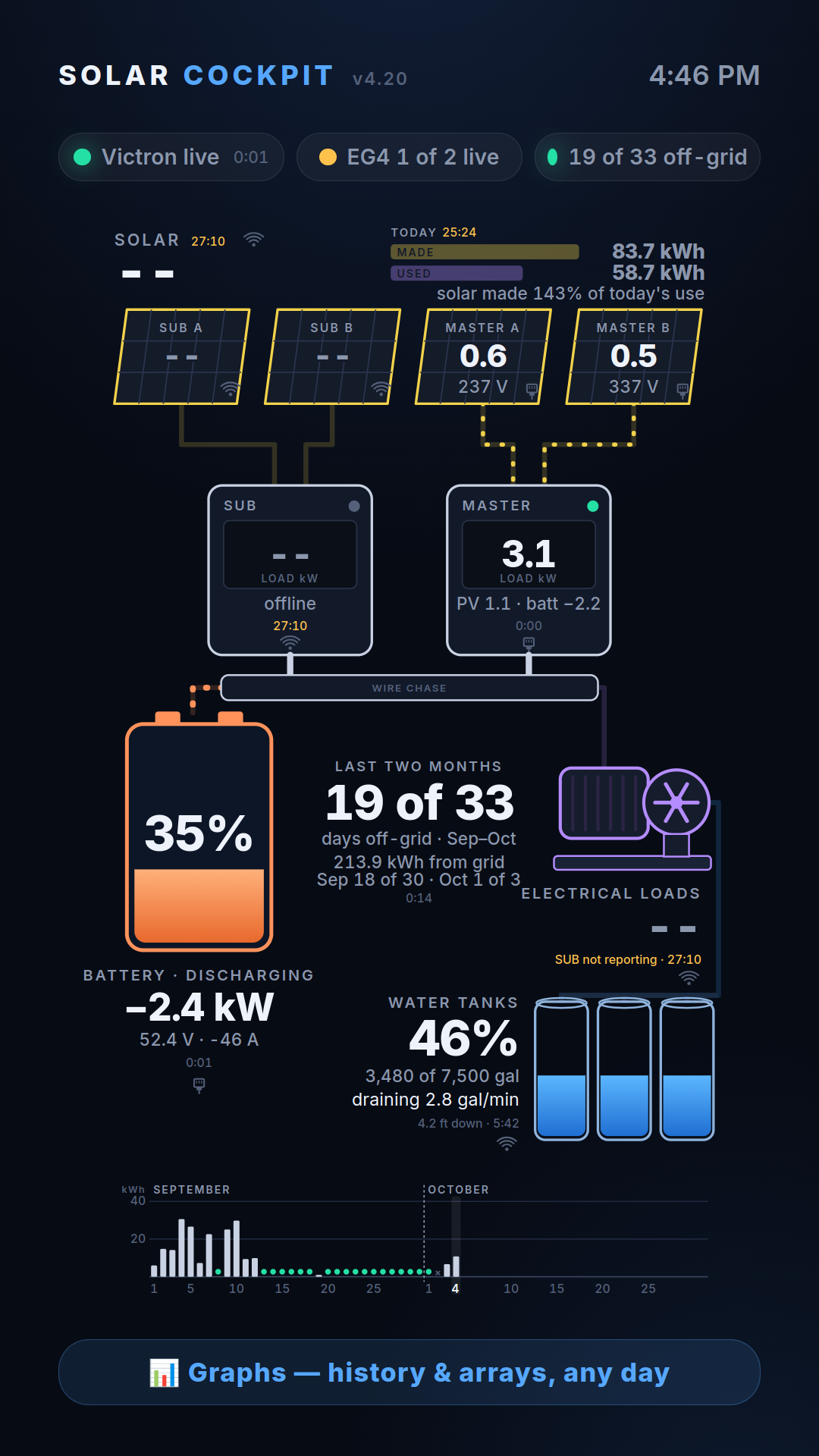
One inverter on the wire, the other still dark, and the totals showing dashes
rather than half the truth. One detail from that first frame: the inverter
believed the battery was at 81 percent while the shunt said 35. The dashboard
ignores the inverter’s opinion and always has.
The second pair of wires got swapped, and at five o’clock:
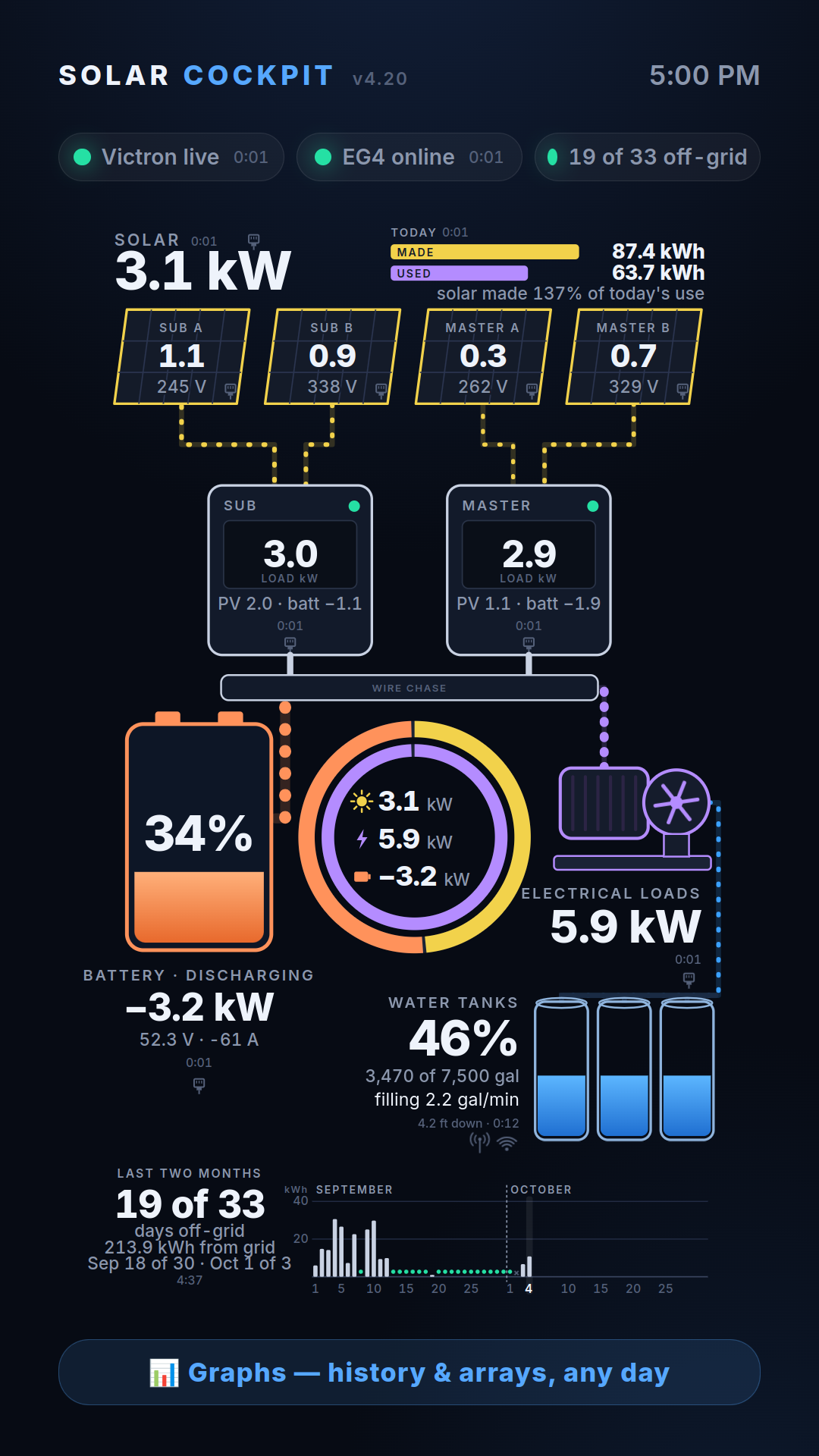
Everything in the solar room on a wire. Plugs on every part of the picture
except the tanks, which get an antenna, because they really are half a mile
away by radio. The ring in the middle is the newest piece: solar coming in, load
going out, and the difference on the battery, the three numbers that matter,
in one place.
The base station needs a better antenna or a better home. The hill unit
should retry when a reading goes unanswered, and its first transmission after
waking arrives weaker than it should. Each part of the picture is getting its
own page when you touch it: one big graphic for the person who wants graphics,
and a full page of numbers underneath for the person who wants numbers, with a
HOME button that says HOME. And the phone app is moving off the vendor clouds
onto the laptop in the solar room.
The version number, though, is finished.
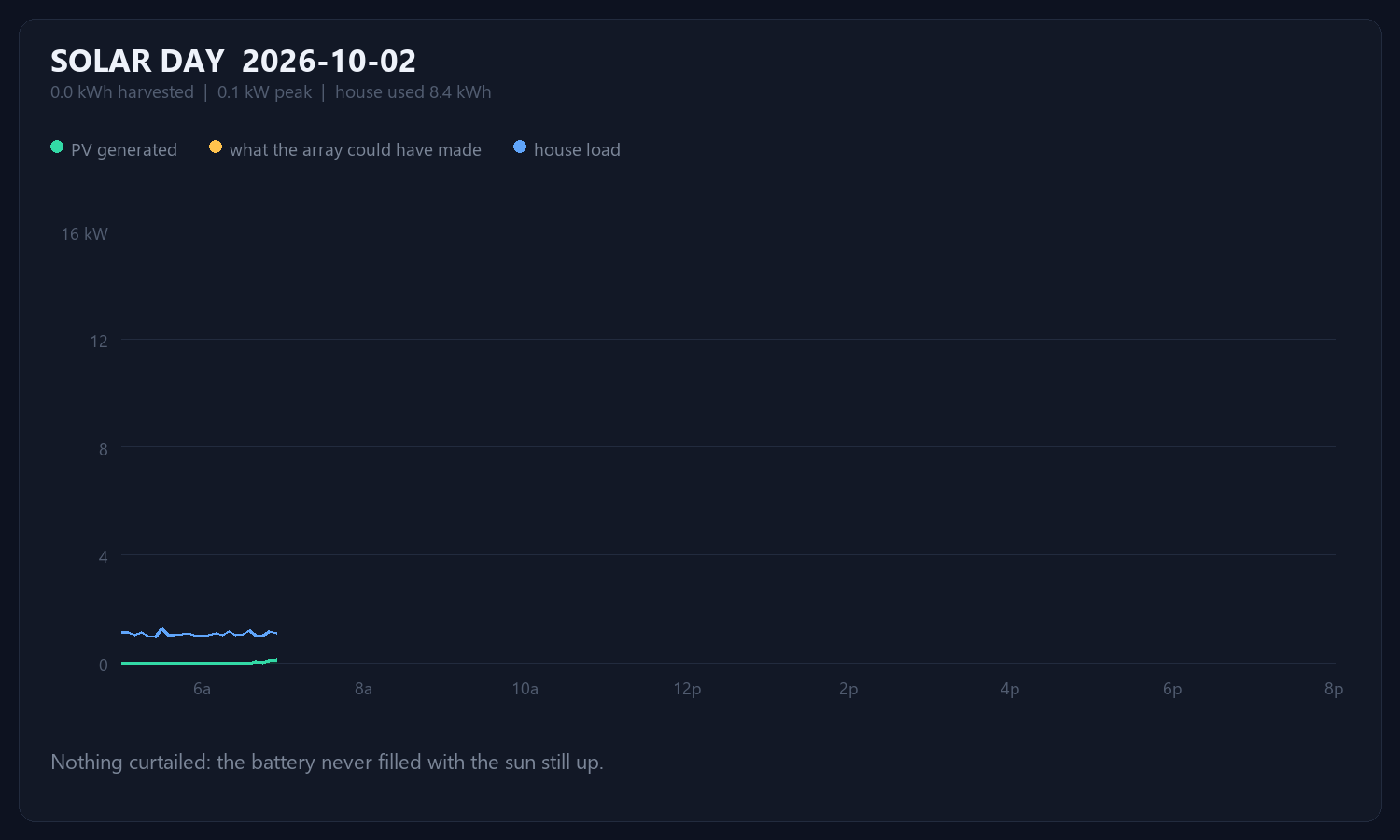
2026-10-02: 0.0 kWh harvested, peaking at 0.1 kW. The house used 8.4 kWh. Nothing was curtailed today – the battery never filled while the sun was still up.
A post went live. The permalink worked. The front page — the URL people
actually type — showed no sign of it for two hours.
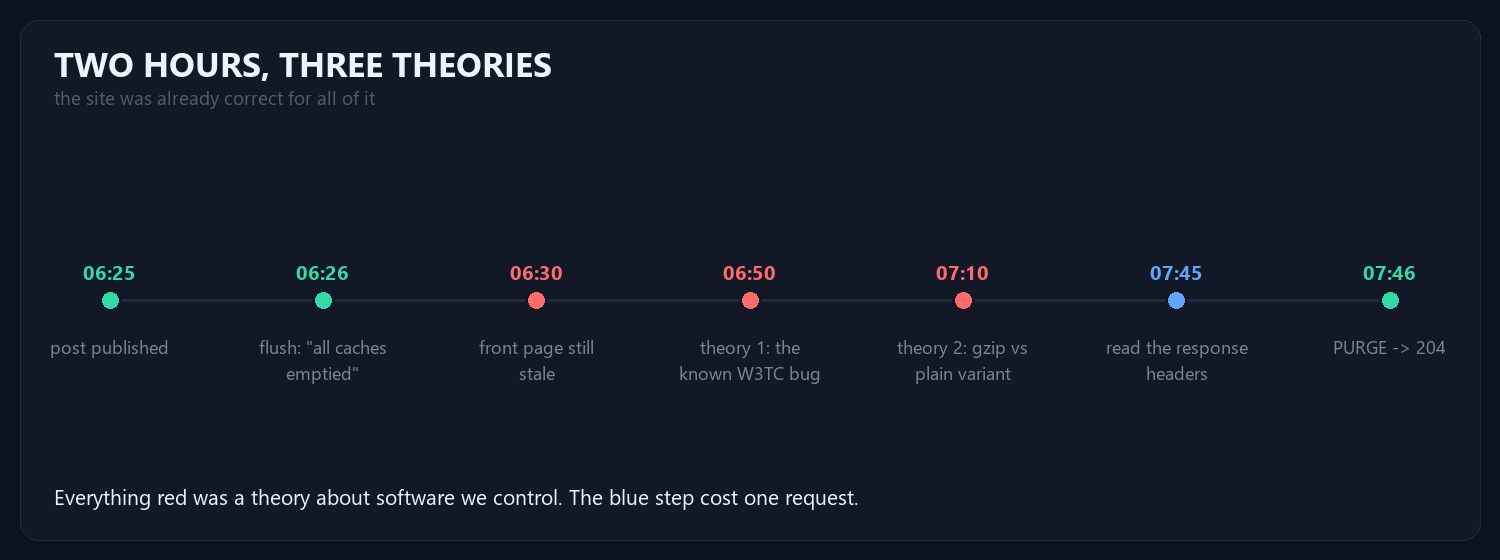
Two of those three theories were about software we control, and both were
documented in our own code from previous incidents. A known bug is the most
seductive wrong answer there is: it explains the symptom, it comes with a
citation, and it stops you looking.
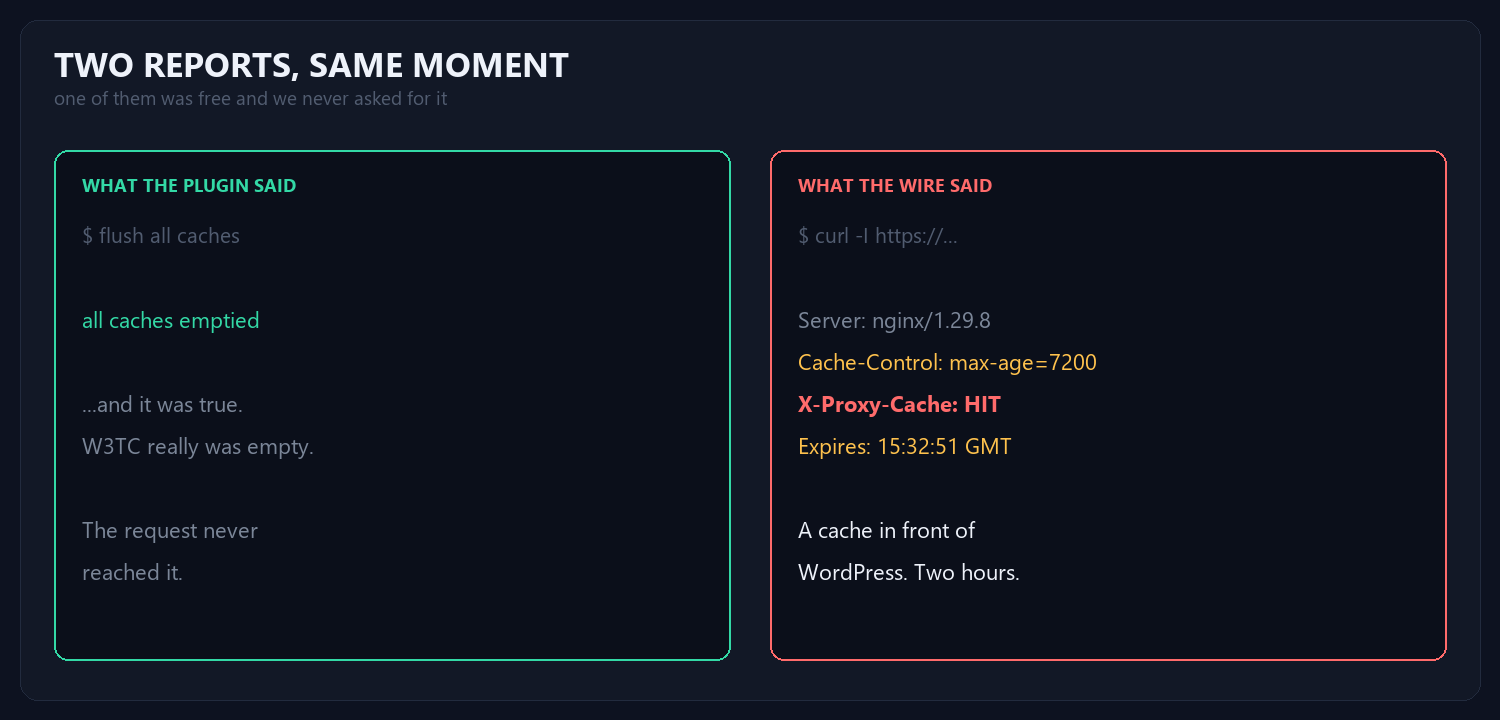
The cache flush reported success every single time, and it was
telling the truth — about the layer it owns. W3TC really
was empty. The request simply never reached it, because the host runs an nginx
proxy cache in front of WordPress with a two-hour TTL.
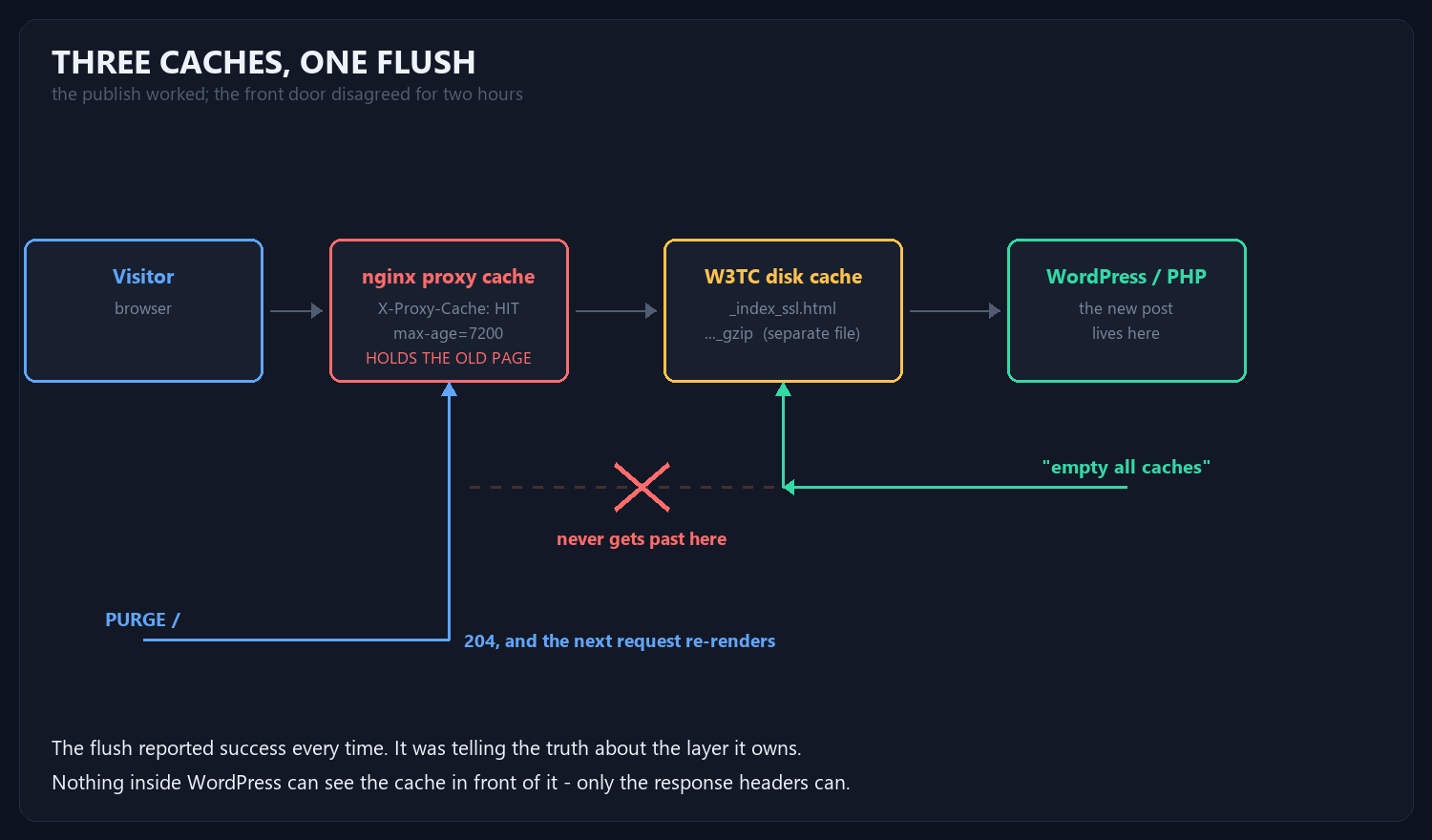
Nothing inside WordPress can see that layer, let alone clear it. But the
proxy accepts a purge:
curl -X PURGE https://example.com/ -> 204
The pipeline now runs flush WordPress → purge the proxy →
warm the front doors, in that order. Warming before purging just
re-cements what the proxy is already holding.
When a flush succeeds and the page is still wrong, you are flushing
the wrong cache.
A flush can only report on the layer it owns. The response headers are a
receipt from every layer that touched the request —
X-Proxy-Cache, Age, Via,
X-Cache, CF-Cache-Status. We theorised for two hours
about our own code; the answer was one curl -I away, in software we
did not know was there.
Read the headers first. They do not have a theory.
2026-09-30 — 102.2 kWh harvested, 16.5 kW peak, 96.8 kWh used by the house. And 3.2 kWh that never got collected at all.
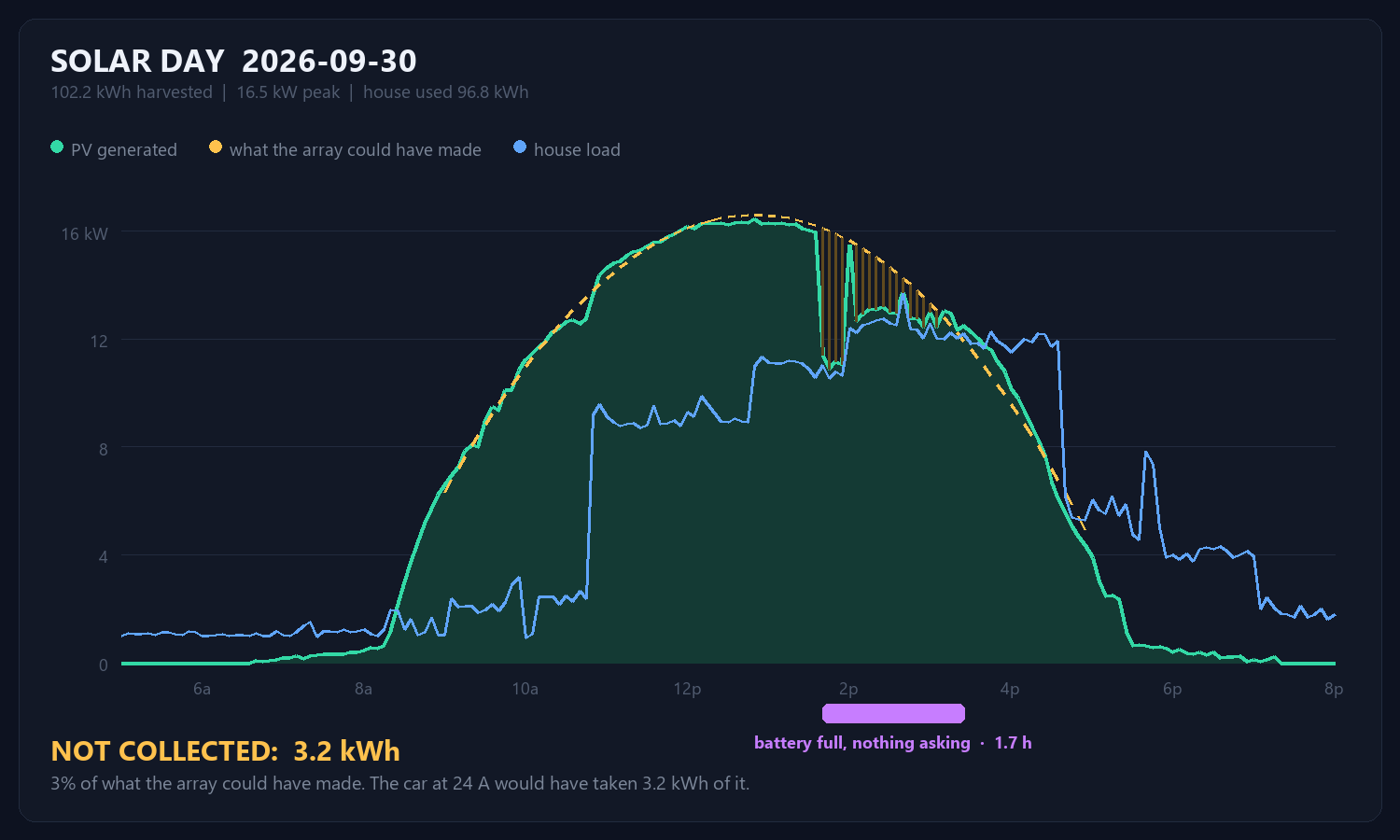
The amber line is what the array could have made; the green is what it did. From 13:40 to 15:25 the two come apart, and the gap between them is energy that was available and simply not taken — 3% of the day’s potential.
Nothing was broken. The battery was full, the house was not asking for much, and a grid-free system with nowhere to put power does the only thing it can: it throttles the array back until generation matches the load. You can watch it happen — through that window PV tracks the house within a couple of hundred watts, and charge power sits at zero.
That is also how you tell curtailment from cloud. Cloud cuts generation while the battery is still hungry. Curtailment only happens when there is nowhere left to put it.
More array would do nothing here; the array is already being told to stop. What is missing is somewhere for the surplus to go between roughly noon and four.
A car is a 60 kWh battery that happens to have wheels. On the 10/4 cord at 24 A it draws 5.76 kW — and the shortfall on this day averaged less than that, so plugging in through the curtailed window would have absorbed 3.2 of the 3.2 kWh. That is about 11 miles of driving that otherwise evaporated as heat the panels never made.
Charging the car at midnight is the habit. On a system like this it is exactly backwards: midnight charging comes out of the battery, while noon charging comes out of sunlight that is currently being refused.
A 2018 Model 3 Long Range, 105,000 miles on it. Two screenshots of the phone
app, six hours apart overnight, turn out to measure the battery more honestly
than any number the car displays.
Here is what they say. At 10:57 PM: 121 miles of range,
charging at 24 A and 234 V, 21 mi/hr, 27 miles added so far. At
5:08 AM: 246 miles, 153 added, and the current has fallen
to 12 A at 239 V even though the dial is still set to 24.
Four separate facts fall out of that pair, and only one of them is the charge
rate.
At 5:08 the car reads 246 miles with 30 minutes left at 10 mi/hr, so a
full charge is about 251 rated miles. Tesla’s rated mile is a
fixed 242 Wh, which makes the usable pack:
251 mi × 242 Wh = 60.7 kWh
It left the factory with 75 kWh. That is 19% gone at 105,000
miles — noticeably worse than the 8–10% a Model 3 of that age
usually shows. Worth knowing, and worth knowing before planning a trip
around the number on the screen.
The day before, the car ran Modesto to Livermore, Livermore to the Santa Cruz
Boardwalk, then down to the harbour — 138 real miles,
starting full. It plugged in showing 93 miles of range.
251 minus 93 is 158 rated miles consumed to cover 138 actual
miles. Every real mile cost 1.14 rated ones. In energy:
158 × 242 Wh = 38.2 kWh over 138 mi =
277 Wh/mi
So the honest range on a full pack, driven the way this car actually gets
driven, is 60.7 kWh ÷ 277 Wh/mi = 219 miles. The display
says 251. It is not lying; it is quoting the EPA’s 242 Wh/mi against a pack
it has measured. It simply has no idea how you drive.
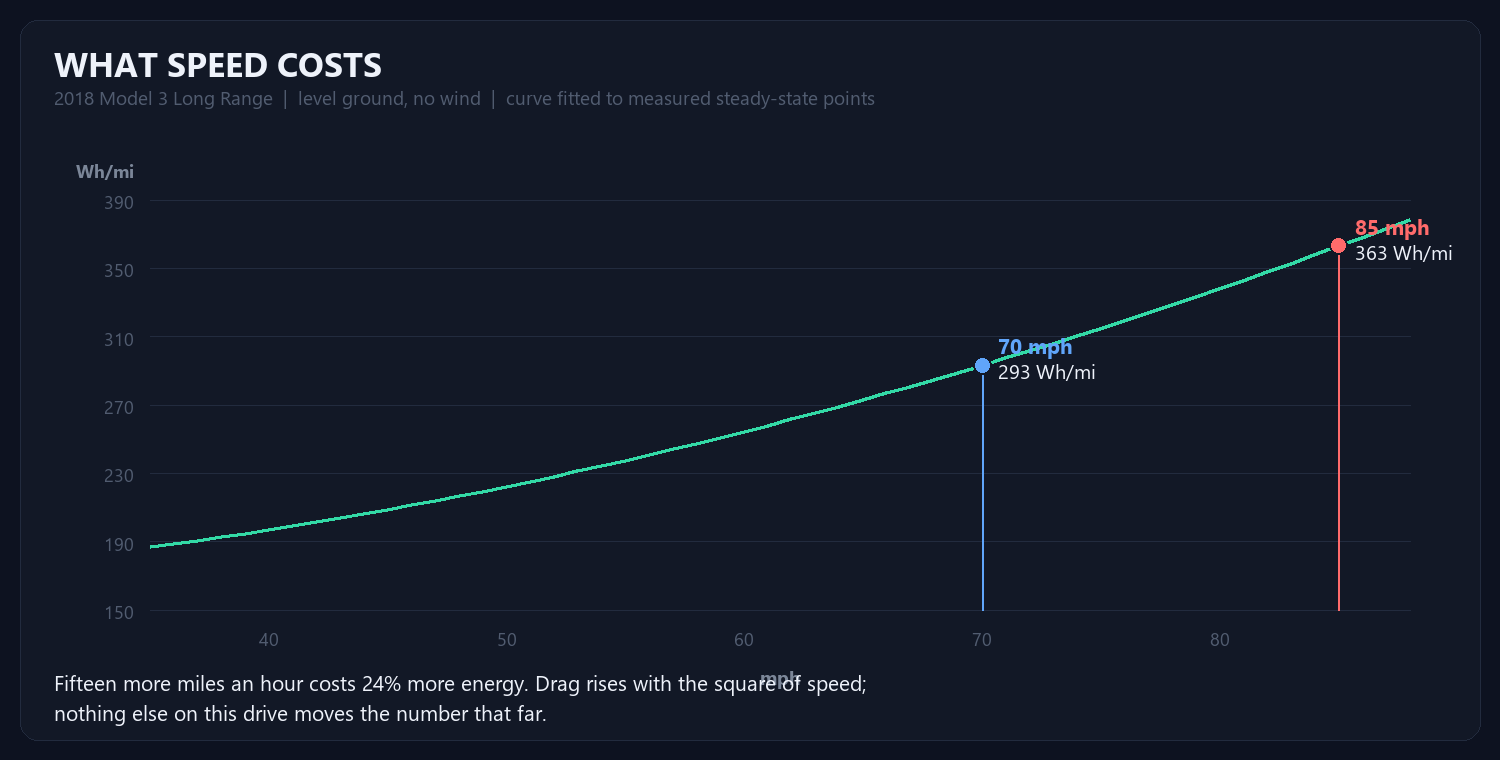
Aerodynamic drag rises with the square of speed, and the power to
overcome it with the cube. That one fact dominates everything else on a
freeway drive. Seventy miles an hour costs about 293 Wh/mi in this car.
Eighty-five costs 363. Fifteen extra miles an hour is 24% more
energy, and it is the only lever on the list that moves the number
that far.
Santa Cruz harbour to San Carlos: up Highway 17 over the summit at
1,800 feet, down into Los Gatos, then 85 and 280 north at 70–85. Sixty
miles. Modelled segment by segment:
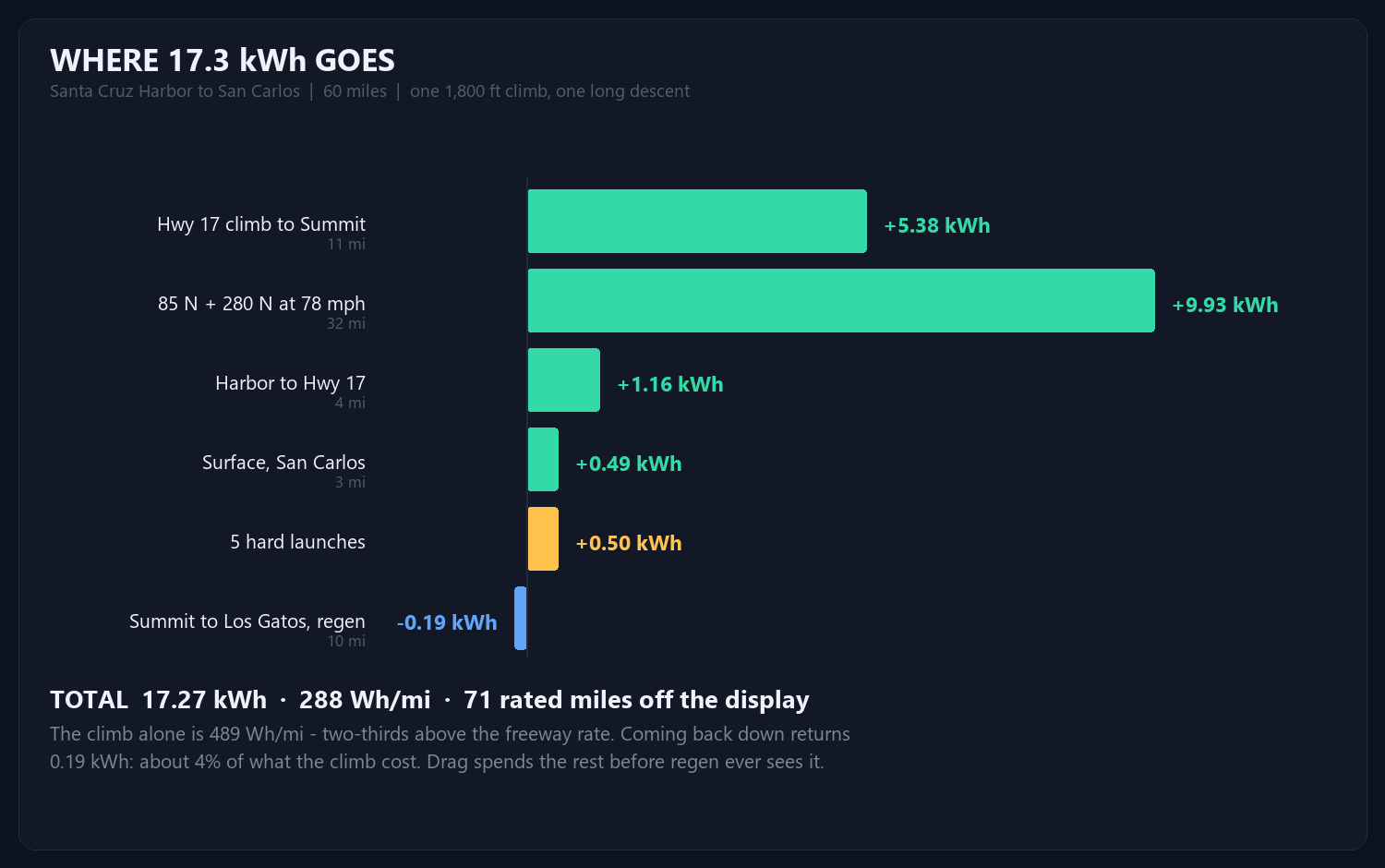
Two things in that ledger are worth arguing about.
The climb costs 489 Wh/mi — two-thirds more than the
freeway rate, because lifting 4,100 lb of car and driver 1,800 feet takes
about 3 kWh no matter how gently you do it.
And coming back down returns 0.19 kWh. About 4% of what the climb
cost. This is the part people get wrong. “Regen all the way down the
hill” sounds like a refund, and it isn’t one. At 60 mph, drag and rolling
resistance are already eating roughly 10.8 kW; gravity on that grade supplies
about 13 kW. Only the surplus reaches the motor, and only about 70%
of that survives the trip back into the battery. Regen’s real job is not to
refill the pack. It is to stop you spending, and to save the brakes.
The five hard launches cost 0.5 kWh between them —
two rated miles, about 3% of the drive. A full-throttle pull feels expensive and
is nearly free, because the kinetic energy you buy is energy you then get to use.
The penalty is just the efficiency of buying it in a hurry. Drive 85 instead of
70 and you will spend six times that much without noticing.
Fifty feet of 10/4 SOOW, an L14-30 to 14-50 adapter, the car dialled down to
24 A. That is the right setting: 24 A is 80% of a 30 A circuit, which
is what continuous load is allowed to draw.
Ten-gauge copper is about 1 mΩ per foot, so fifty feet out and back is
0.1 Ω — 2.4 V of drop at 24 A, 1% of the
supply, 58 W warming the cable. Entirely fine.
But look at the two voltage readings. 239 V at 12 A,
234 V at 24 A. Five volts for twelve amps is
0.42 Ω of source impedance, and the cord only accounts
for a quarter of it. The other 0.32 Ω is upstream —
the supply itself sagging under load. Two numbers in a screenshot, and the
weakest link in the circuit identifies itself without a meter.
125 rated miles added between 10:57 PM and 5:08 AM — six hours
eleven minutes — is 20.2 rated miles per hour, or about
4.9 kW into the pack. Predicted from first principles: 24 A ×
234 V = 5.62 kW of AC, × 92% for the onboard charger =
5.2 kW, 21.4 rated mi/hr. The measured average comes in
just under because of the last hour.
That last hour is the 12 A reading. The dial still says 24. Nobody turned
it down — the car did, because it was at 98% and tapering, which is what
constant-voltage charging looks like from the outside. Reading that number as
“the circuit is weak” would have been exactly wrong.
The standing advice is to live between 20% and 80–85% and leave 100% for
trips, because lithium cells age faster held at a high state of charge. The
exception is calibration. The car does not measure state of charge directly; it
infers it, and that inference drifts. Charging to 100% and letting it rest gives
the BMS the top reference it needs, and a deep discharge gives it the bottom.
That is why this one went to 100% overnight: to find out whether 251 miles is
really what is left. Then back to 85% for daily use — and the honest
planning number from here is not 251, and not 219 either. It is 85% of
60.7 kWh at whatever speed you actually drive, which at 78 mph
on 280 is about 170 real miles.
Measure the thing. The dashboard is an opinion.
Consumption curve fitted to published steady-state measurements and
anchored against this car’s own two drives; grade energy computed from mass and
elevation, regen credited only on the surplus left after drag. The model
predicted 158 rated miles for the Modesto run. The car reported 158.